Vibe Coding 课程-干货集训
好看有品前端Skills
TRAE支持Skills协议
创建Skill
- 直接在TRAE里描述需求
- 比如:“帮我创建一个做word自动排版的技能”
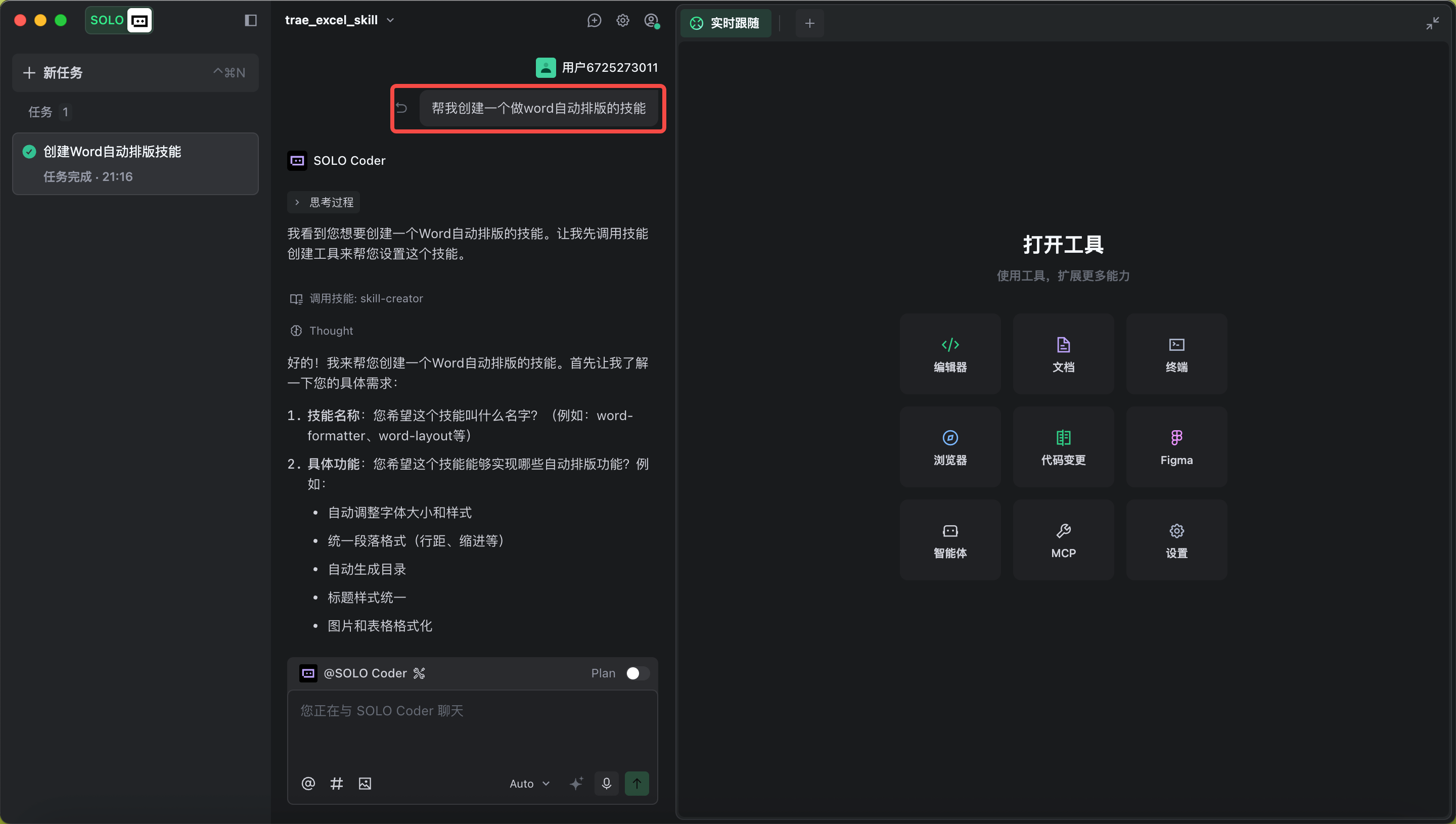
- 「设置」 - 「规则与技能」中增加
- 打开「设置」 - 「规则与技能」,点击「技能」-「创建」

- 上传SKILL的压缩包或skill二进制文件。支持添加名称、描述和触发指令(command)
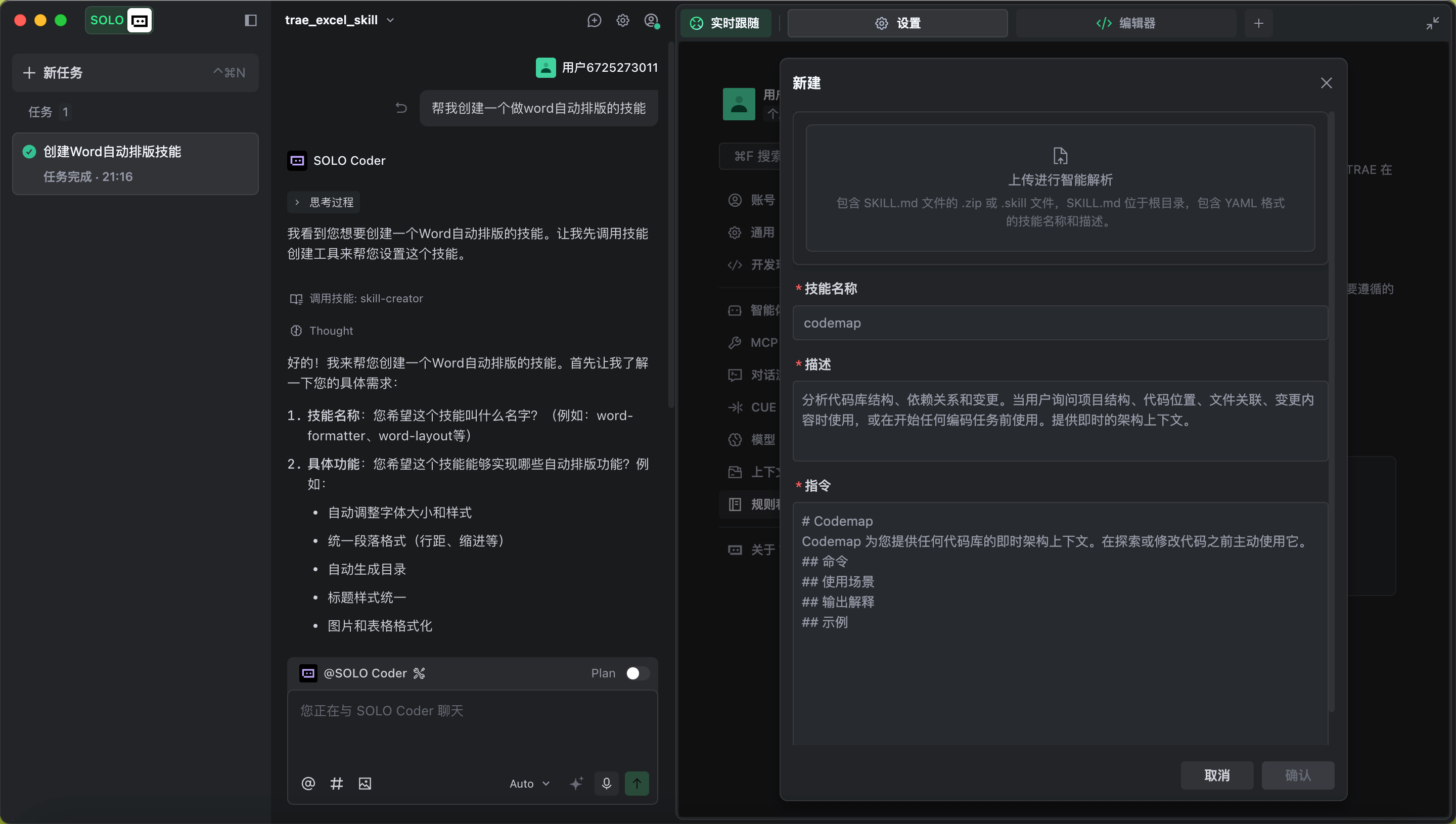
- 打开「设置」 - 「规则与技能」,点击「技能」-「创建」
安装Claude官方Skills
- 安装OpenSkills
- 打开终端,输入
npm i -g openskills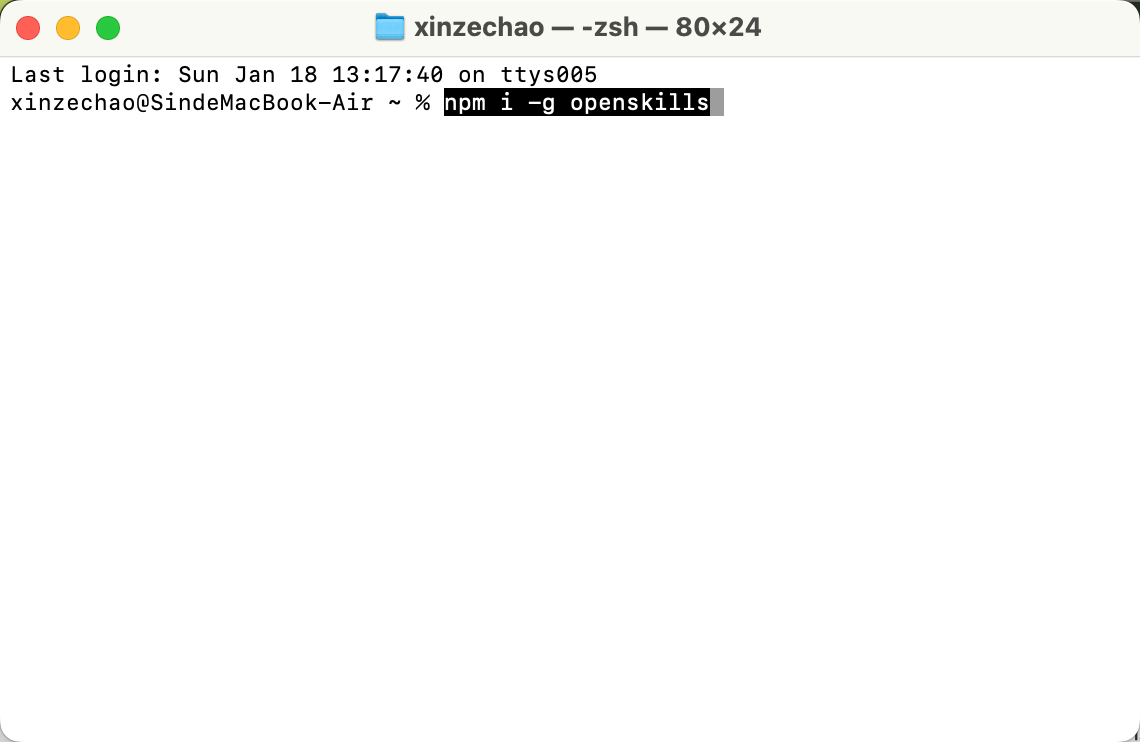
- 打开终端,输入
- 使用openskills下载Claude官方skill
- 全局安装
- 安装官方Skills(仓库)
- 比如安装canvas-design skill,指令是
openskills install anthropics/skills/canvas-design --global
- 比如安装canvas-design skill,指令是
- 同步配置到Trae的规则中,让Trae知道如何调用
- 在终端里输入指令:
openskills sync --output ~/.trae/project_rules.md
- 安装官方Skills(仓库)
- 安装到指定项目
- 进入项目
- 在终端里输入以下指令,“/Users/xx/test/”是你想安装的项目的路径,不知道可以打开项目,问问Trae这个项目的路径
cd /Users/xx/test/
- 在终端里输入以下指令,“/Users/xx/test/”是你想安装的项目的路径,不知道可以打开项目,问问Trae这个项目的路径
- 安装skill到项目
openskills install anthropics/skills/canvas-design - 同步配置
openskills sync - 创建 .Trae目录(如果已有则不需要)
mkdir -p .trae - 把配置写进项目的Rules里
cat agents.md > .trae/project_rules.md
- 进入项目
- 全局安装
用Skills写出好看有品位的网页
从自身的痛点出发
- 你的痛点可能是:
- 自己不懂UI设计,做不出好看的设计稿
- AI写的前端页面千篇一律,AI味很浓
- 希望前端遵循一些规范(布局、组件库等),但也希望能在风格上做一些创新
- ...
根据痛点,选择解决方案
- 如果你认为创意最重要,但对规范没有要求,建议你直接使用Claude官方的设计Skill
- frontend-design skill
- 没有AI味,设计的创造力不错
- frontend-design skill
- 如果你希望遵循规范,但不要求设计美感,建议你使用一个开源Skill
- ui-ux-pro-max
- 这里提供了一个设计规范库,可以直接复刻很多通用网页的设计规范(如Saas、数据后台等)
- ui-ux-pro-max
- 如果你希望同时遵循设计规范和设计美感,建议你试试我搭EVA Skills的思路
EVA Skills搭建
和AI讨论Skill方案
- 跟AI说:
我想做一个写前端页面的大师级Skill 希望解决的问题是: 做出来的前端页面具备独特的设计美感,同时可以满足我要求的设计规范 有两个前端Skill可用: https://github.com/anthropics/skills/tree/main/skills/frontend-design https://github.com/nextlevelbuilder/ui-ux-pro-max-skill 你可以考虑做一个新的skill来调用这两个skill,实现我的需求 我希望你从前端专家和专业设计师的视角出发,向我了解清楚我的需求。然后帮我设计这一Skill的架构和工作流程 - 跟AI明确你的具体需求
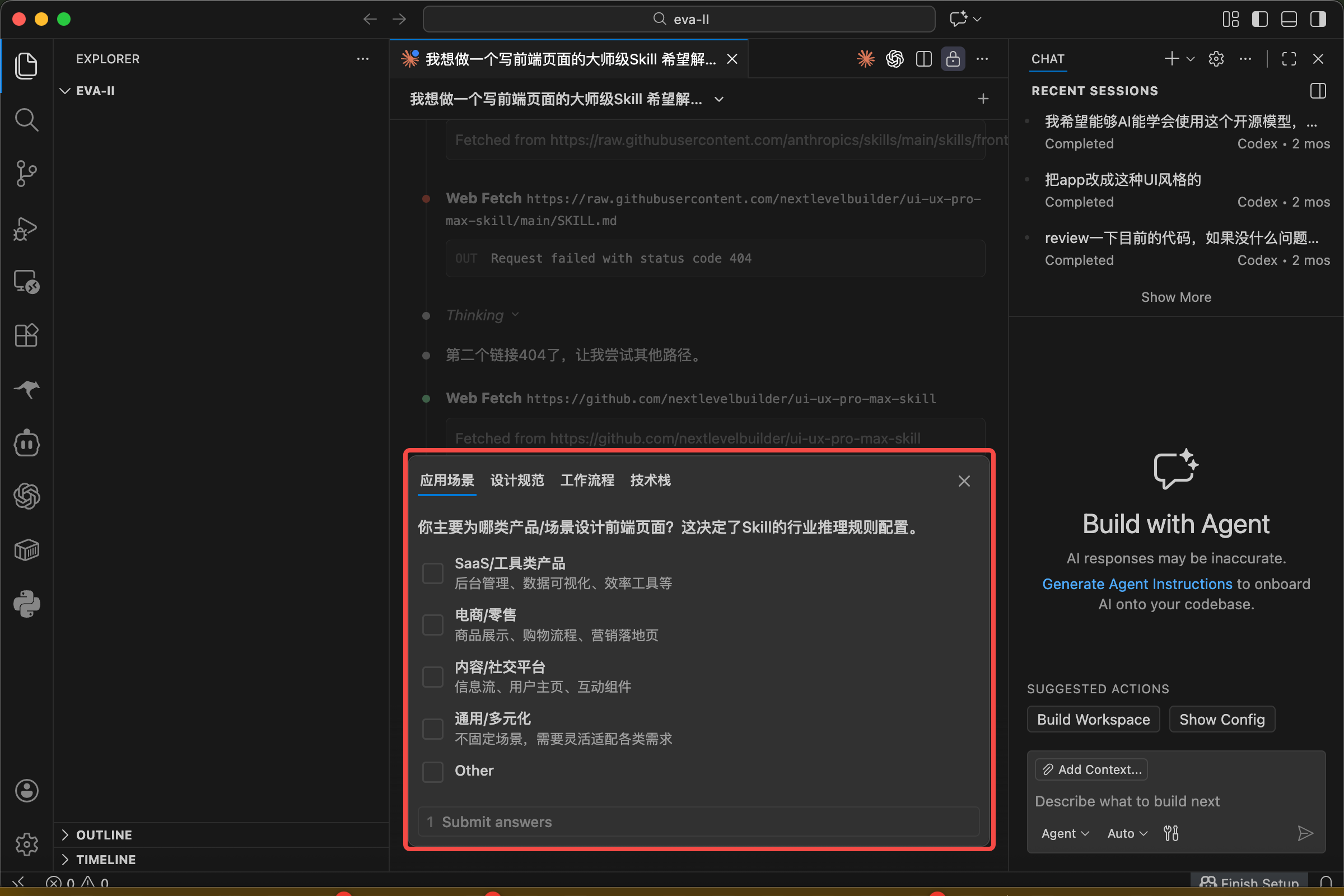
确认框架和工作流程
- 明确需求后,AI会输出Skill架构和工作流程
- 示例
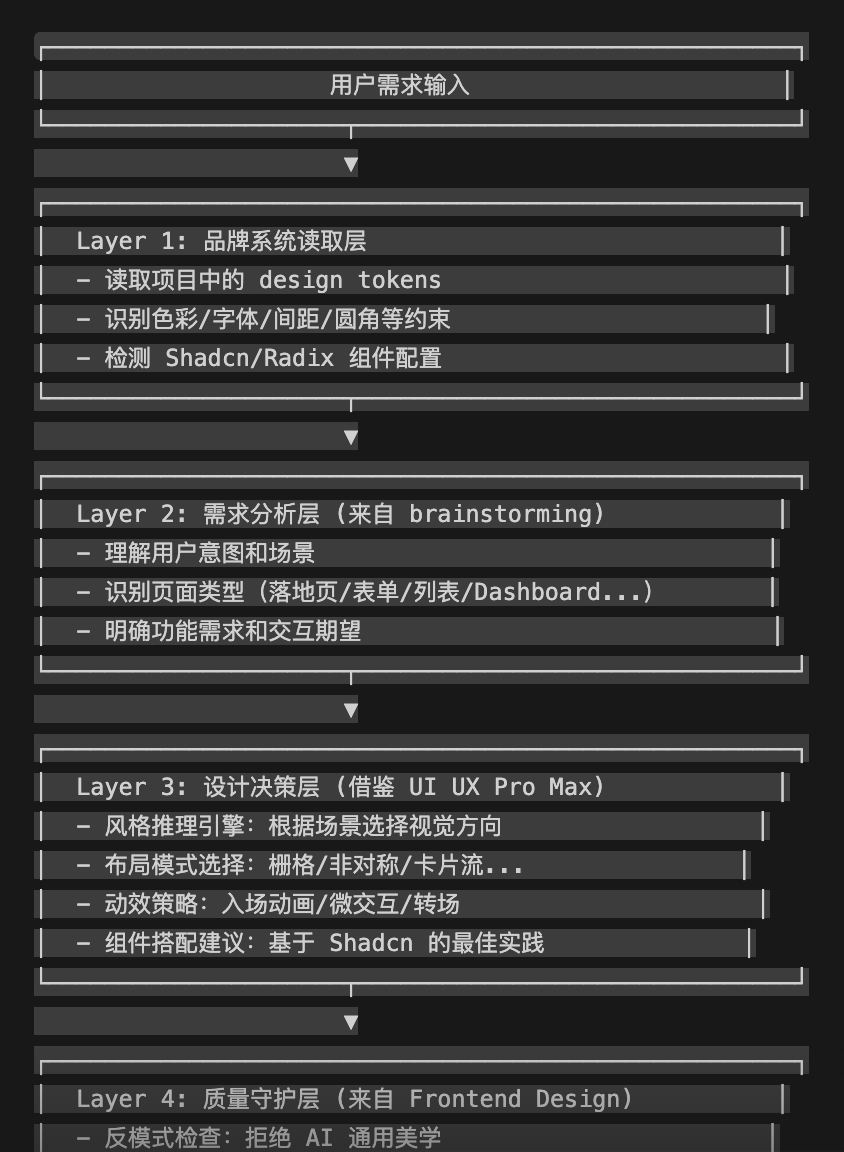
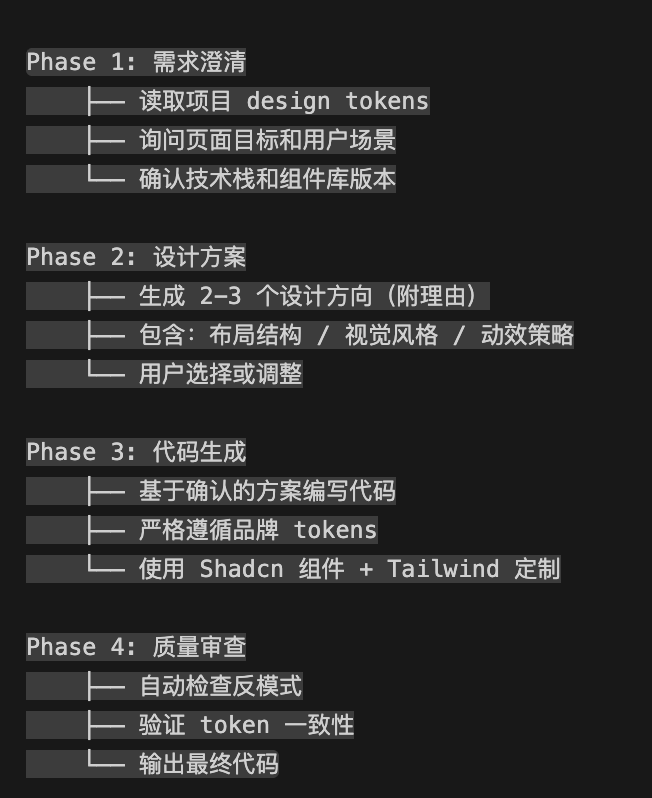
- 和AI深度讨论,确认最终的架构
- 最终结果(参考)
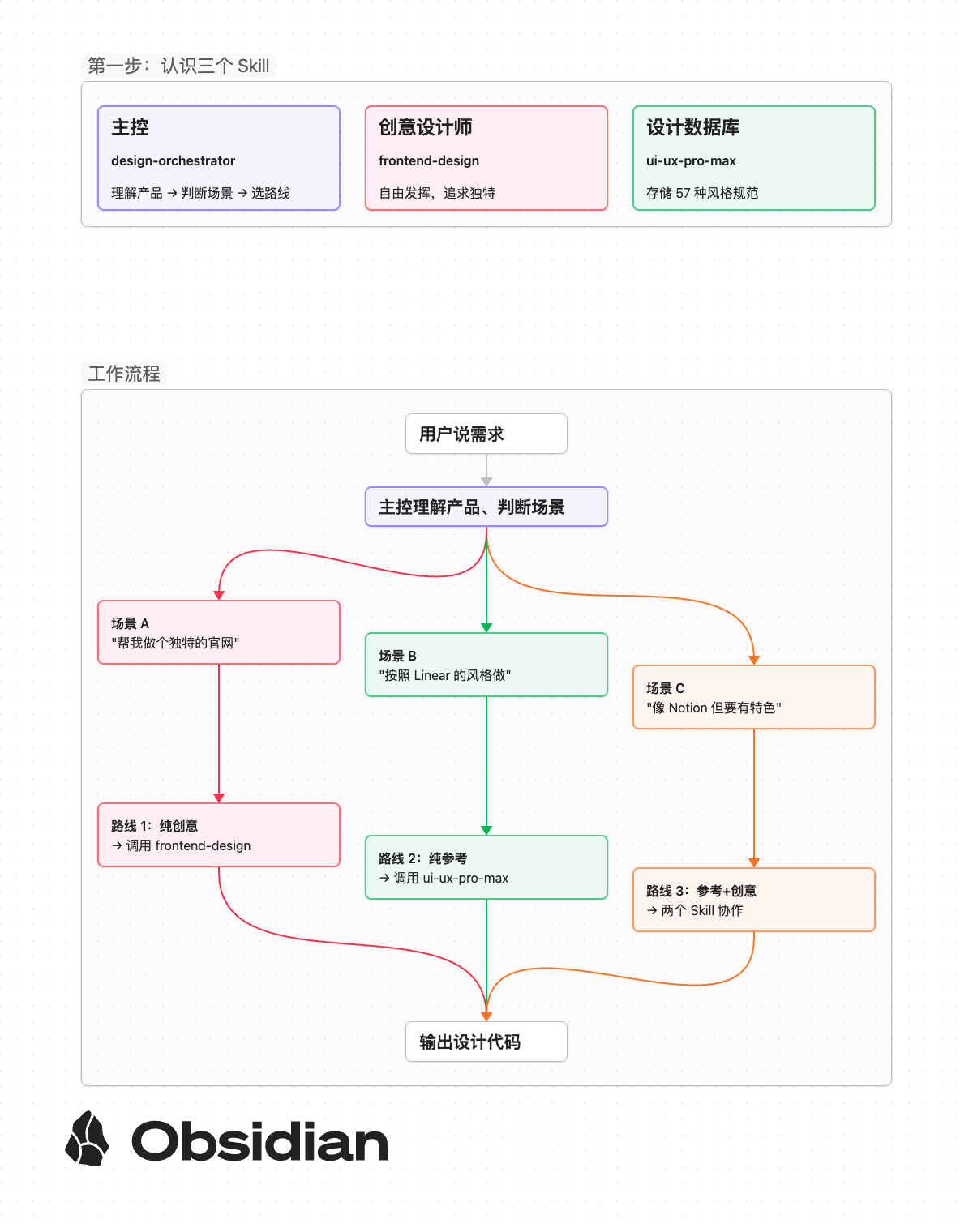
测试与优化
- 输入一些命题,测一下Skill的实际效果
- 测试案例分析
写作工具
AI简历助手
Claude Skills社区
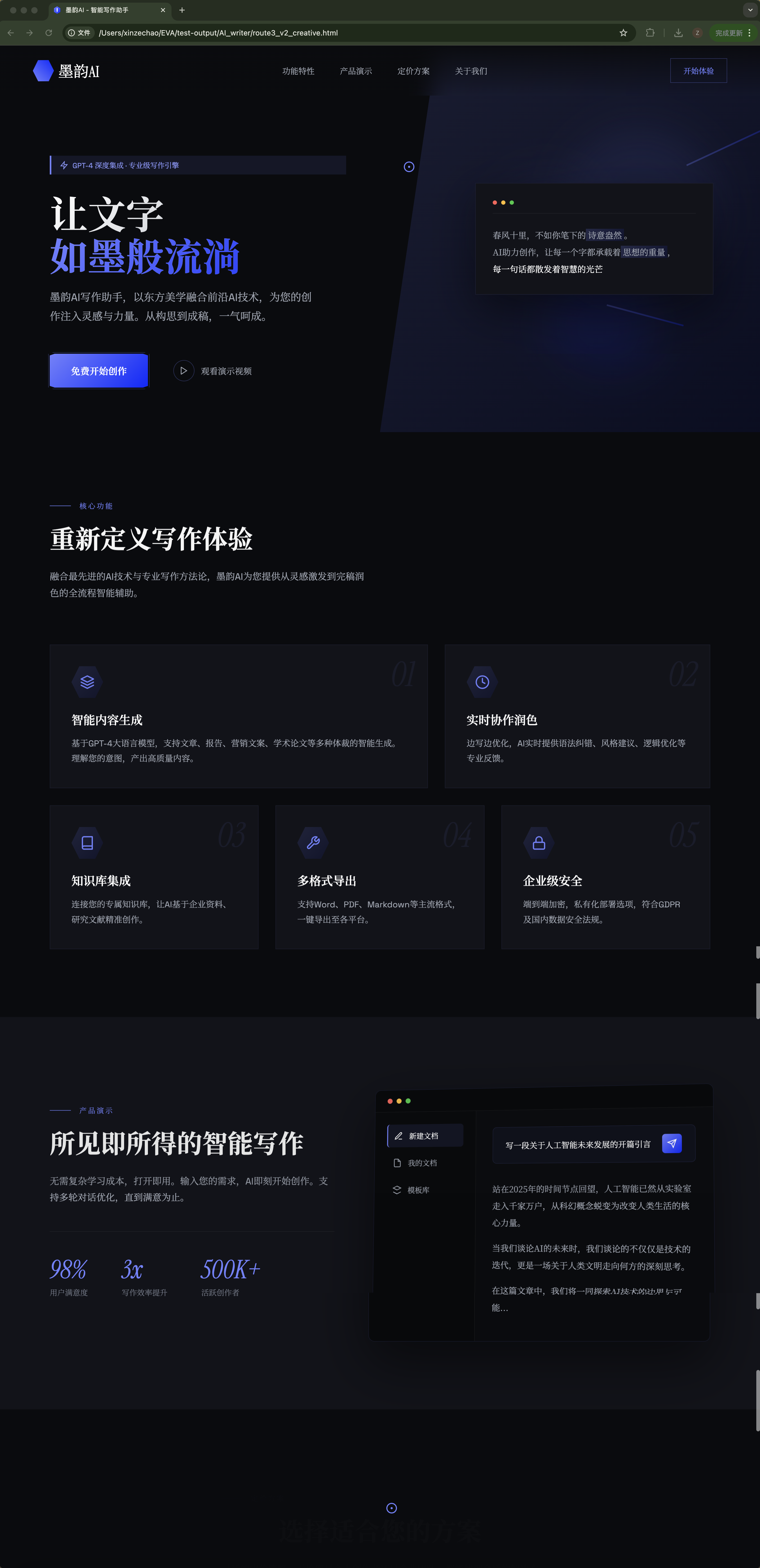
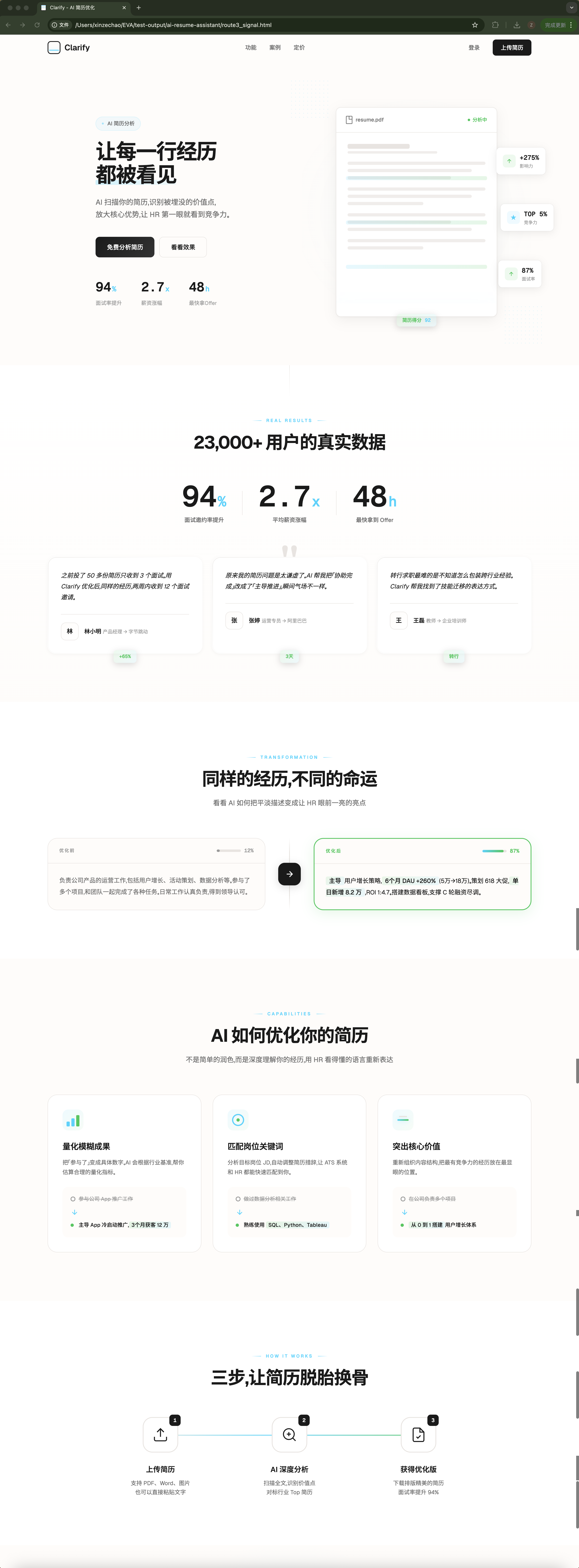

- 如果觉得差点意思,就告诉它你的感受、你看到的现象,让它找出具体的原因,提供优化Skill的解决方案。优化几轮,最终一个好的Skill就出来了
UI规范提取Skill搭建
和AI讨论Skill方案
- 跟AI说:
我想做一个提取UI规范的大师级Skill 要求 保持像Johnny Ive那样的设计精度进行UI规范提取 输出 提取的UI规范存入ui-ux-pro-max的数据库中,要完全符合它的规范和字段要求,确保之后在使用ui-ux-pro-max时可以调用新增的UI规范 你需要从专业的UI设计师和网页爬虫专家视角,向我了解需求细节。明确需求后,开始制定Skill的框架和工作流程 - 和AI明确你的需求
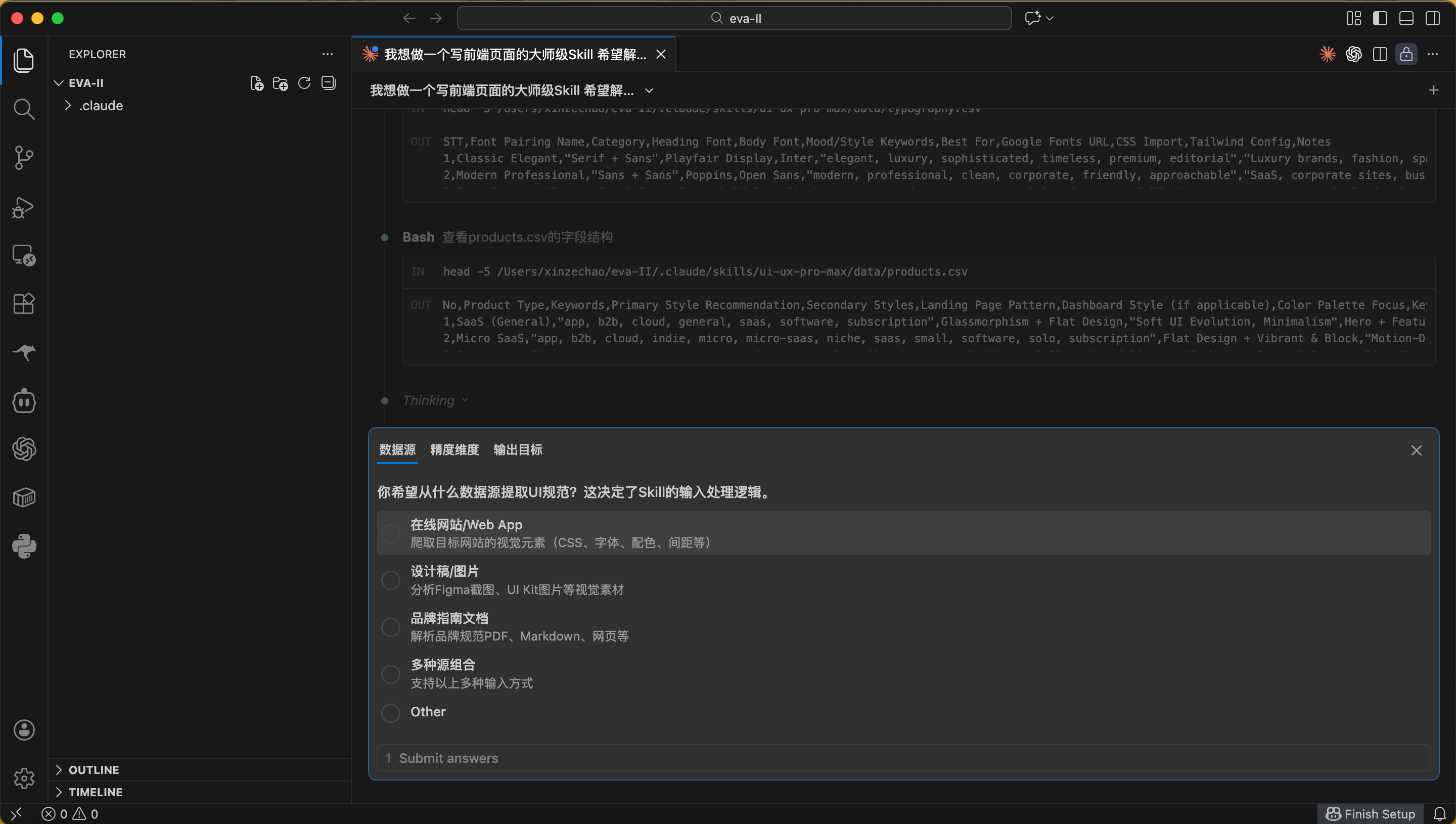
确认框架和工作流程
- 明确需求后,AI会给出Skill的框架和工作流程
- 示例
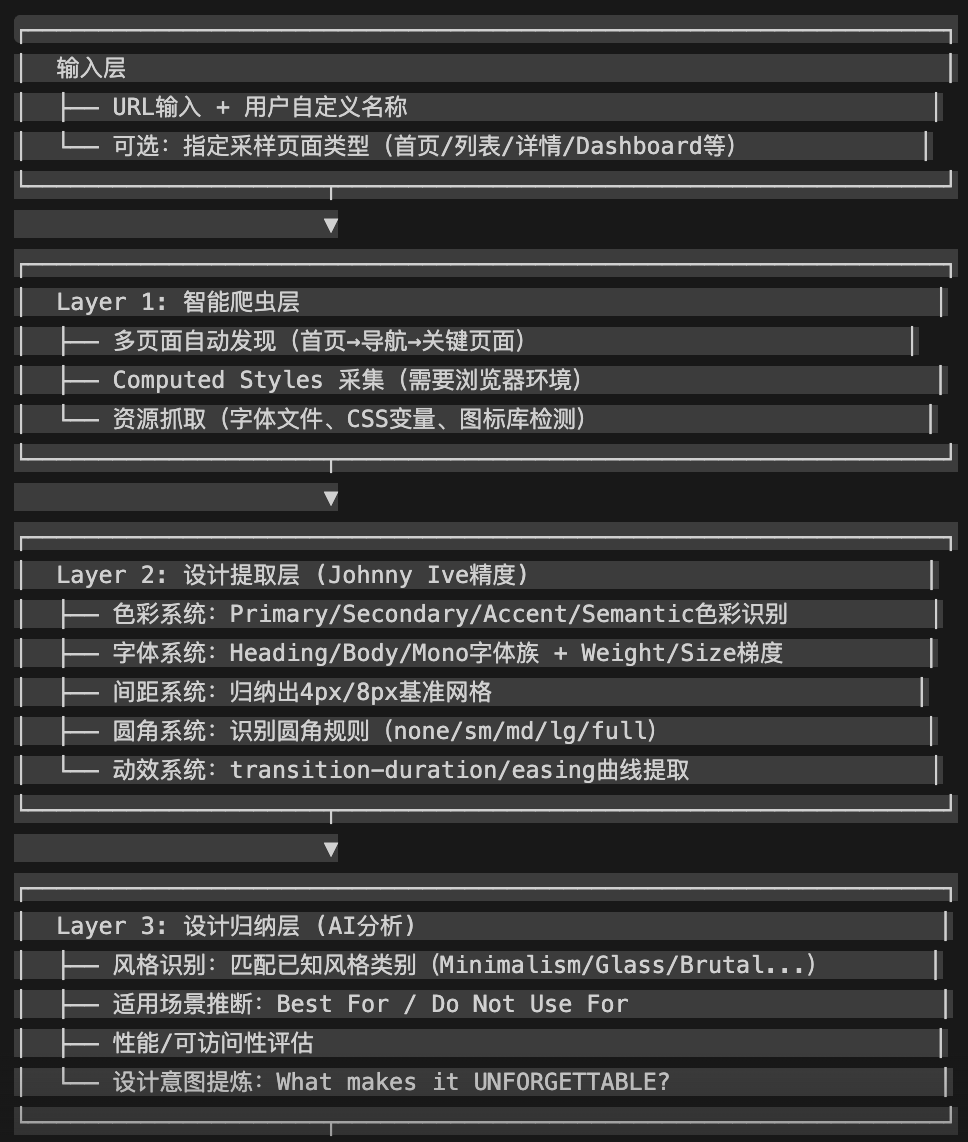
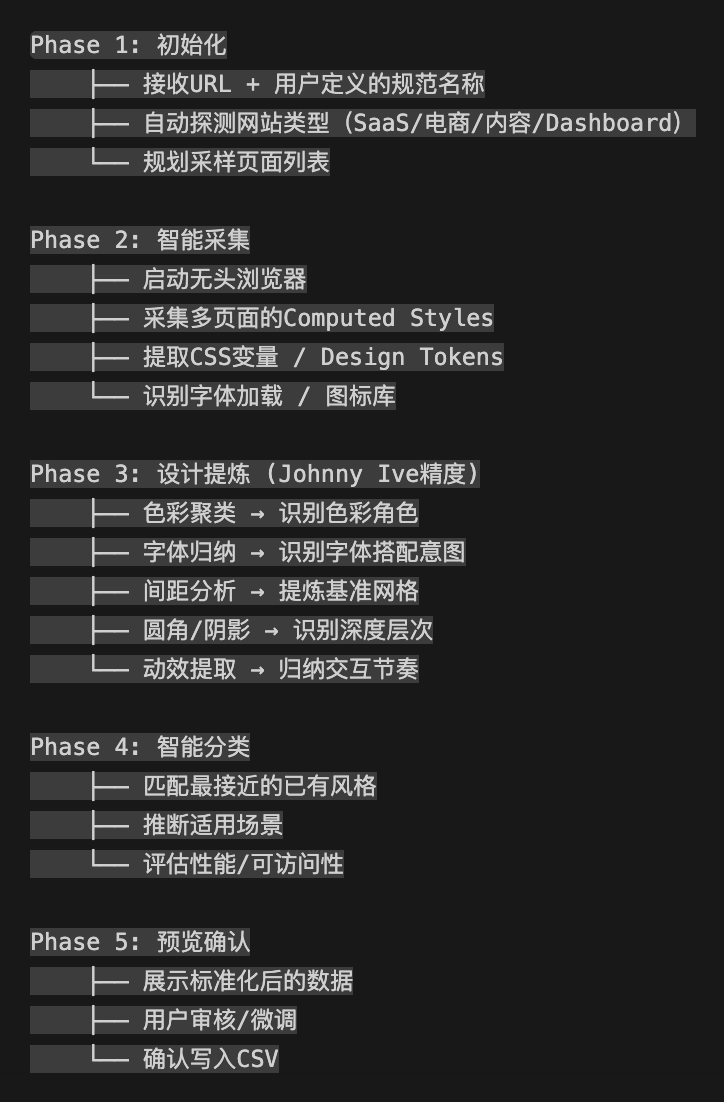
- 如果你觉得不满意,就和它讨论如何调整
- 最终结果(参考)

测试优化
- 拿几个网站,测试一下实际的爬取和分析效果。不断调优Skill。
Skill分享
文件夹结构
.claude/skills/
│
├── design-orchestrator/          # 设计主控器
│   ├── filter-rules.json         # 路线判断的过滤规则配置
│   └── SKILL.md                  # Skill 核心定义(协调逻辑)
│
├── frontend-design/              # 创意前端设计师
│   └── SKILL.md                  # Skill 核心定义(设计规范)
│
├── ui-style-extractor/           # UI 风格提取工具
│   ├── output/                   # 提取结果输出目录
│   ├── prompts/                  # AI 分析用的提示词模板
│   ├── scripts/                  # 截图和解析脚本
│   ├── templates/                # 输出格式模板
│   └── SKILL.md                  # Skill 核心定义
│
└── ui-ux-pro-max/                # 设计规范数据库
    ├── data/                     # 风格/配色/字体等 CSV 数据
    ├── scripts/                  # 数据查询脚本
└── SKILL.md # Skill 核心定义Skills具体内容
主控Skill:design-orchestrator
filter-rules.json
{
  "version": "1.0.0",
  "description": "Conflict filter rules for design-orchestrator. Used when Route 3 (Reference + Creative) is selected.",

  "fonts": {
    "remove": {
      "items": [
        "Inter",
        "Roboto",
        "Arial",
        "Helvetica",
        "system-ui",
        "sans-serif",
        "-apple-system",
        "BlinkMacSystemFont",
        "Segoe UI"
      ],
      "reason": "Generic/overused fonts that frontend-design explicitly prohibits",
      "replacement_guidance": {
        "sans-serif": "Choose a distinctive sans-serif font (e.g., Satoshi, General Sans, Outfit)",
        "serif": "Choose a characterful serif font (e.g., Fraunces, Instrument Serif)",
        "monospace": "Choose a unique monospace font (e.g., JetBrains Mono, Berkeley Mono)"
      }
    },
    "warn": {
      "items": [
        "Space Grotesk",
        "Poppins",
        "Montserrat",
        "Open Sans",
        "Lato"
      ],
      "reason": "Overused in AI-generated designs, consider alternatives",
      "suggestion": "These fonts are acceptable but may feel generic. Consider alternatives for more distinctive results."
    },
    "keep": {
      "description": "All other font recommendations are kept as valuable reference"
    }
  },

  "colors": {
    "warn": [
      {
        "pattern": "purple_gradient_on_white",
        "description": "Purple gradient (#8B5CF6 to #6366F1 or similar) on white background",
        "hex_ranges": {
          "primary": ["#8B5CF6", "#7C3AED", "#6366F1", "#818CF8"],
          "background": ["#FFFFFF", "#FAFAFA", "#F9FAFB"]
        },
        "reason": "Classic 'AI slop' aesthetic, extremely overused"
      },
      {
        "pattern": "generic_blue_primary",
        "description": "Generic blue as primary without specific context",
        "hex_values": ["#3B82F6", "#2563EB", "#1D4ED8"],
        "reason": "Very common default, acceptable but not distinctive"
      }
    ],
    "keep": {
      "description": "All specific hex values are kept - they are valuable data points",
      "note": "Warnings are informational, not removal triggers"
    }
  },

  "layout": {
    "warn": [
      {
        "pattern": "generic_card_grid",
        "description": "Standard 3-column card grid without variation",
        "reason": "Extremely common, consider asymmetric or unconventional layouts"
      },
      {
        "pattern": "hero_features_cta",
        "description": "Hero section → Features grid → CTA without creative variation",
        "reason": "Template-like structure, consider unique section flow"
      }
    ],
    "keep": {
      "items": [
        "spacing_values",
        "grid_systems",
        "component_patterns",
        "responsive_breakpoints"
      ],
      "description": "Technical specifications are always valuable"
    }
  },

  "always_keep": {
    "description": "These items are NEVER filtered or warned, always passed through",
    "items": [
      "hex_color_values",
      "spacing_values_px",
      "border_radius_values",
      "animation_timing_ms",
      "animation_easing_functions",
      "shadow_definitions",
      "accessibility_ratings",
      "performance_notes",
      "best_for_recommendations",
      "not_for_recommendations",
      "framework_compatibility",
      "complexity_rating"
    ]
  },

  "output_format": {
    "filtered_item": {
      "original": "string - original value",
      "action": "REMOVED | WARNED | KEPT",
      "reason": "string - why this action was taken",
      "guidance": "string - what to do instead (for REMOVED items)"
    }
  }
}
SKILL.md
---
name: design-orchestrator
description: 设计工作流主控器。分析用户需求,选择最优路线(纯创意/纯参考/参考+创意),处理skill间冲突,协调ui-ux-pro-max和frontend-design完成设计任务。
---
# Design Orchestrator - 设计主控Skill
## 核心原则
**重要声明:本skill不修改任何子skill的内部逻辑和工作机制**
```
┌─────────────────────────────────────────────────────────┐
│ │
│ 本skill的职责边界: │
│ │
│ ✓ 分析用户需求 │
│ ✓ 判断使用哪条路线 │
│ ✓ 调用子skill(不修改其内部) │
│ ✓ 在子skill之间传递信息时进行过滤 │
│ ✓ 需求模糊时询问用户 │
│ │
│ ✗ 不修改 frontend-design 的任何规则 │
│ ✗ 不修改 ui-ux-pro-max 的任何数据或搜索逻辑 │
│ ✗ 不直接生成设计或代码 │
│ │
└─────────────────────────────────────────────────────────┘
```
## 本skill的定位
```
用户
│
▼
┌─────────────────────┐
│ design-orchestrator │ ← 你在这里(交通指挥员)
│ │
│ • 听用户说什么 │
│ • 判断走哪条路 │
│ • 协调两个skill │
│ • 解决信息冲突 │
└─────────────────────┘
│
├──────────────────────────┐
▼ ▼
┌─────────────┐ ┌─────────────┐
│ ui-ux- │ │ frontend- │
│ pro-max │ │ design │
│ │ │ │
│ (原封不动) │ │ (原封不动) │
└─────────────┘ └─────────────┘
```
---
## Phase 0: 产品理解(前置阶段)
**在判断走哪条路线之前,必须先完成产品理解。**
这是设计工作的"地基",没有产品理解就开始设计,相当于没有地基就盖房子。
```
┌─────────────────────────────────────────────────────────────────┐
│ 为什么需要这个阶段? │
│ │
│ 之前的问题: │
│ ├── 直接跳到"选风格"(侘寂风、Apple风、极繁风...) │
│ ├── 风格只是表面,缺少"为什么选这个风格"的支撑 │
│ └── 结果:设计好看但空洞,没有真正放大产品价值 │
│ │
│ 正确的做法: │
│ ├── 先理解产品本质和核心价值 │
│ ├── 再找到能放大这个价值的视觉隐喻 │
│ └── 风格自然从隐喻中生成,不是预先贴标签 │
│ │
└─────────────────────────────────────────────────────────────────┘
```
### Step 0.1: 信息收集
必须回答的问题(如果从用户需求中无法推断,则主动询问用户):
```
┌─────────────────────────────────────────────────────────────────┐
│ 必答问题 │
├─────────────────────────────────────────────────────────────────┤
│ │
│ 1. 产品本质 │
│ "这个产品是什么?解决什么问题?" │
│ (不是功能列表,是一句话的本质定义) │
│ │
│ 2. 目标用户 │
│ "谁会用这个产品?他们是什么样的人?" │
│ │
│ 3. 核心目的 │
│ "用户来这里最想得到什么?" │
│ (不是"浏览",是更深层的目的) │
│ │
│ 4. 差异化 │
│ "和同类产品相比,希望突出的差异是什么?" │
│ (如果有参考对象,这个问题尤其重要) │
│ │
└─────────────────────────────────────────────────────────────────┘
```
**询问用户的方式(示例):**
```
想确认几个问题帮助我更好地设计:
1. 这个产品的核心价值是什么?用户来这里最想得到什么?
□ 选项A
□ 选项B
□ 选项C
□ 其他:____
2. 和同类产品(如XX)相比,你希望突出的差异是?
□ 更专业/开发者向
□ 更社区/交流向
□ 更精品/策展向
□ 其他:____
```
### Step 0.2: 价值提炼
基于收集的信息,提炼出:
```
┌─────────────────────────────────────────────────────────────────┐
│ 价值提炼模板 │
├─────────────────────────────────────────────────────────────────┤
│ │
│ 核心价值(最多2个): │
│ ├── 主要价值: ____________________ │
│ └── 次要价值: ____________________ │
│ │
│ 体验目标: │
│ ├── 用户应该感受到: "____________________" │
│ ├── 用户应该感受到: "____________________" │
│ └── 用户不应该感受到: "____________________" │
│ │
└─────────────────────────────────────────────────────────────────┘
```
**注意:**
- 核心价值不是功能,是用户获得的"好处"
- 体验目标是感性的,不是理性的功能描述
- "不应该感受到"同样重要,它定义了边界
### Step 0.3: 视觉隐喻探索
基于核心价值,探索能放大这个价值的视觉隐喻:
```
┌─────────────────────────────────────────────────────────────────┐
│ 视觉隐喻探索 │
├─────────────────────────────────────────────────────────────────┤
│ │
│ 问:什么隐喻能放大"[核心价值]"? │
│ │
│ 候选隐喻A: [隐喻名称] │
│ ├── 为什么能放大价值: ____________________ │
│ └── 自然生成的视觉方向: ____________________ │
│ │
│ 候选隐喻B: [隐喻名称] │
│ ├── 为什么能放大价值: ____________________ │
│ └── 自然生成的视觉方向: ____________________ │
│ │
│ 候选隐喻C: [隐喻名称] │
│ ├── 为什么能放大价值: ____________________ │
│ └── 自然生成的视觉方向: ____________________ │
│ │
└─────────────────────────────────────────────────────────────────┘
```
**关键原则:**
- 隐喻决定风格,不是先选风格再找隐喻
- 每个隐喻都要能解释"为什么它能放大产品价值"
- 可以询问用户倾向哪个隐喻方向
**询问用户的方式(示例):**
```
基于"[核心价值]",我想到了几个视觉方向:
A. [隐喻A]:强调[价值点],视觉上偏向[方向描述]
B. [隐喻B]:强调[价值点],视觉上偏向[方向描述]
C. [隐喻C]:强调[价值点],视觉上偏向[方向描述]
你倾向哪个?或者有其他想法?
```
### Step 0.4: 输出《产品理解文档》
完成以上步骤后,输出《产品理解文档》,作为后续设计工作的基础:
```markdown
## 产品理解文档
### 产品本质
[一句话定义]
### 核心价值
- 主要: [价值1]
- 次要: [价值2]
### 体验目标
- 用户应该感受到: "[感受1]"
- 用户应该感受到: "[感受2]"
- 用户不应该感受到: "[反面感受]"
### 视觉隐喻
- 选定隐喻: [隐喻名称]
- 选择理由: [为什么这个隐喻能放大核心价值]
- 视觉方向: [隐喻自然生成的视觉语言]
```
---
### 什么时候可以跳过 Phase 0?
```
┌─────────────────────────────────────────────────────────────────┐
│ 可以简化的情况 │
├─────────────────────────────────────────────────────────────────┤
│ │
│ 1. 路线2(纯参考) │
│ 用户明确要还原某个设计,不需要创意 │
│ → 产品理解可以简化,但仍建议确认用户真正的目的 │
│ │
│ 2. 用户已经给出足够信息 │
│ 用户在需求中已经明确了产品本质、价值、甚至隐喻 │
│ → 直接提炼,不需要额外询问 │
│ │
│ 3. 非常简单的任务 │
│ 如:单个按钮、单个组件、纯技术实现 │
│ → 不需要完整的产品理解 │
│ │
├─────────────────────────────────────────────────────────────────┤
│ 必须完整执行的情况 │
├─────────────────────────────────────────────────────────────────┤
│ │
│ 1. 路线1(纯创意)或路线3(参考+创意) │
│ 需要创意的任务,必须有产品理解支撑 │
│ │
│ 2. Landing Page / 产品官网 │
│ 这类任务的核心就是"传达产品价值" │
│ │
│ 3. 用户需求模糊 │
│ 不清楚要做什么、为谁做、为什么做 │
│ │
└─────────────────────────────────────────────────────────────────┘
```
---
## 三条路线定义
### 路线1:纯创意模式
**何时使用:**
- 用户要求独特、创新、与众不同
- 用户明确不想参考任何现有设计
- 用户强调"不要像别人"、"有记忆点"
**触发关键词:**
```
独特、创新、与众不同、不要像别人、有记忆点、
眼前一亮、打破常规、大胆、独创、标新立异
```
**执行流程:**
```
用户需求 → 直接交给 frontend-design → 输出
```
**示例:**
```
用户: "帮我做一个让人眼前一亮的作品集网站"
判断:
├── "眼前一亮" → 追求独特
├── 无参考对象
└── 结论: 路线1
执行:
└── 将需求原样传递给 frontend-design
```
---
### 路线2:纯参考模式
**何时使用:**
- 用户想严格按照某个现有设计来实现
- 用户要快速/标准/常规的设计
- 用户明确说"按照XX做"、"照着XX来",不强调独特性
- 追求"还原度"而非"独特性"
**触发关键词:**
```
按照XX做、照着XX来、就用XX的风格、
标准做法、快速出一个、常规、和XX一样
```
**执行流程:**
```
用户需求
│
▼
调用 ui-ux-pro-max 获取设计规范
│
▼
严格按照规范实现(不过滤,直接用)
│
▼
输出:符合规范的HTML代码
```
**与路线3的关键区别:**
```
路线2:规范说用Inter,就用Inter(不过滤)
路线3:规范说用Inter,过滤掉,换成独特字体
```
**示例:**
```
用户: "按照NotebookLM的风格做一个Landing Page"
判断:
├── "按照XX做" → 要还原
├── 没说要独特/有特色
└── 结论: 路线2
执行:
├── Step1: 搜索 ui-ux-pro-max 获取NotebookLM规范
│ ├── 配色: #7182FF, #0B28FF, #1F1F1F...
│ ├── 字体: Google Sans
│ └── 动效: 280ms ease
│
└── Step2: 严格按照规范实现
├── 直接用 Google Sans(或替代的Inter)
├── 直接用 #7182FF 等配色
└── 输出: 高还原度的HTML
```
---
### 路线3:参考+创意模式
**何时使用:**
- 用户想参考某个设计,但要有自己的特色
- 用户说"像XX但不同"、"基于XX"、"借鉴XX"
- 需求既有参考对象,又强调独特性
- **这是最常用的路线**
**触发关键词:**
```
参考XX但、像XX但不同、基于XX风格、借鉴XX、
类似XX但要有特色、XX的感觉但、受XX启发
```
---
#### 核心概念:约束层 vs 表达层
路线3的关键在于区分"什么要参考"和"什么要创新":
```
┌─────────────────────────────────────────────────────────────┐
│ 约束层(需遵守) │
│ 这些是参考的"精髓",应当保留: │
│ │
│ ├── 设计调性:专业/活力/温暖/科技/极简... │
│ ├── 信息架构:页面有哪些section、什么顺序 │
│ ├── 配色数值:具体的Hex值(可微调色相/明度) │
│ └── 动效参数:时长(ms)、缓动函数 │
├─────────────────────────────────────────────────────────────┤
│ 表达层(需创意) │
│ 这些是"如何呈现",frontend-design应完全重构: │
│ │
│ ├── 视觉语言:元素怎么"画"、图形风格、视觉隐喻 │
│ ├── 布局方式:同样的Hero可以用分屏/对角线/非对称/3D... │
│ ├── 交互设计:hover效果、滚动动画、微交互、光标效果 │
│ ├── 字体选择:必须独特,禁用通用字体 │
│ └── 特色细节:印章按钮、墨迹飞溅、浮动元素、独特图标... │
└─────────────────────────────────────────────────────────────┘
```
**举例说明:**
```
参考NotebookLM做AI写作助手:
约束层(保留):
├── 调性:专业、可信赖、现代
├── 架构:Hero介绍 → 功能展示 → 演示 → 价格 → CTA
├── 配色:#7182FF紫蓝色系(可调整色相)
└── 动效:280ms ease
表达层(自由发挥):
├── 视觉:可以用水墨风格、几何切割、有机曲线...
├── 布局:Hero可以是对角线分割、分屏、竖排导航...
├── 交互:可以有墨迹跟随、书法笔触动画、卷轴滚动...
├── 字体:Noto Serif SC、Playfair Display、Sora...
└── 细节:印章按钮、毛笔光标、诗意文案...
```
---
**执行流程:**
```
用户需求
│
▼
调用 ui-ux-pro-max 搜索参考
│
▼
提取约束层信息(调性、架构、配色、动效)
│
▼
过滤表达层的通用元素(字体等)
│
▼
将"约束层 + 表达层自由度说明"传递给 frontend-design
│
▼
frontend-design 在约束层基础上自由创作表达层
│
▼
输出
```
**示例:**
```
用户: "参考NotebookLM的风格,给我的AI写作助手做一个官网,要有自己的特色"
判断:
├── "参考NotebookLM" → 有参考对象
├── "有自己的特色" → 要求独特
└── 结论: 路线3
执行:
├── Step1: 搜索 ui-ux-pro-max 获取NotebookLM规范
│
├── Step2: 拆分约束层和表达层
│ ├── 约束层(传递给frontend-design需遵守):
│ │ ├── 调性: 专业、可信赖、现代、高效
│ │ ├── 架构: Hero → Features → Demo → Pricing → CTA
│ │ ├── 配色: #7182FF, #0B28FF(可调整)
│ │ └── 动效: 280ms ease
│ │
│ └── 表达层(告知frontend-design完全自由):
│ ├── 视觉语言: 自由
│ ├── 布局方式: 自由(可打破标准布局)
│ ├── 交互设计: 自由
│ ├── 字体: ⚠️ 禁止通用字体,请选择独特字体
│ └── 特色细节: 自由创造记忆点
│
└── Step3: 传递给 frontend-design
└── "遵守约束层,但表达层请完全自由发挥"
```
---
## 过滤规则
**注意:过滤只在路线3中进行,且只过滤"传递给frontend-design的信息",不修改ui-ux-pro-max的原始数据**
### 字体过滤
| 动作 | 字体 | 原因 |
|------|------|------|
| **移除** | Inter | frontend-design 明确禁止 |
| **移除** | Roboto | frontend-design 明确禁止 |
| **移除** | Arial | frontend-design 明确禁止 |
| **移除** | Helvetica | 过于通用 |
| **移除** | system-ui | 过于通用 |
| **移除** | -apple-system | 过于通用 |
| **移除** | sans-serif (通用声明) | 无具体指向 |
| **警告** | Space Grotesk | AI生成常用,过度使用 |
| **警告** | Poppins | 过度使用 |
| **警告** | Montserrat | 过度使用 |
**移除后的替换指引:**
```
被移除的是无衬线字体 → "请选择独特的无衬线字体(如Satoshi, General Sans, Outfit)"
被移除的是衬线字体 → "请选择有个性的衬线字体(如Fraunces, Instrument Serif)"
被移除的是等宽字体 → "请选择独特的等宽字体(如JetBrains Mono, Berkeley Mono)"
```
### 配色过滤
| 动作 | 配色模式 | 原因 |
|------|----------|------|
| **警告** | 紫色渐变(#8B5CF6→#6366F1) + 白底 | 典型"AI味"配色 |
| **警告** | 通用蓝(#3B82F6)作为主色且无特定理由 | 过于常见 |
**注意:配色只警告,不移除。具体Hex值是有价值的参考数据。**
### 布局过滤
| 动作 | 布局模式 | 原因 |
|------|----------|------|
| **警告** | 标准三列卡片网格 | 模板感太强 |
| **警告** | Hero→Features→CTA 标准结构 | 过于常规 |
### 绝对保留项(永不过滤)
```
✓ 所有具体Hex颜色值
✓ 所有间距数值 (8px, 16px, 24px...)
✓ 所有圆角数值 (4px, 8px, 16px...)
✓ 所有动效时长 (150ms, 200ms, 300ms...)
✓ 所有缓动函数 (ease, ease-out, ease-in-out...)
✓ 所有阴影定义
✓ 无障碍评级
✓ 性能评级
✓ "适合场景"建议
✓ "不适合场景"建议
✓ 框架兼容性评分
✓ 复杂度评级
```
---
## 模糊需求处理
当用户需求不明确时,**必须主动询问**,不要猜测。
### 询问模板
```
我可以用几种方式帮你完成这个设计:
**A. 纯创意模式**
我会创造一个独特的设计,不基于任何现有参考。
追求:与众不同、眼前一亮、有记忆点
**B. 纯参考模式**
我会严格按照某个现有产品的设计规范来实现。
追求:高还原度、标准、快速
**C. 参考+创意模式**(推荐)
我会参考某个设计,但在此基础上创造有独特个性的作品。
追求:有参考的精髓,但也有自己的特色
你想用哪种方式?如果选B或C,请告诉我你想参考哪个产品/网站。
```
### 判断依据
| 用户说的 | 判断 |
|----------|------|
| "帮我做一个网页" | **模糊** → 询问 |
| "帮我做一个独特的网页" | 路线1 |
| "按照Stripe的风格做一个网页" | 路线2 |
| "做一个像Stripe的网页" | **模糊**(要还原还是要独特?)→ 询问 |
| "做一个像Stripe但有特色的网页" | 路线3 |
**注意:** 如果用户只是问"Stripe的配色是什么",这是单纯的查询请求,不属于三条路线,直接返回查询结果即可。
---
## 输出格式
### 路线1输出(产品理解 + 完全自由创作)
将《产品理解文档》+ 用户需求传递给frontend-design创作:
```markdown
## 设计Brief
**工作模式:** 纯创意
---
### 📋 产品理解(设计的"为什么")
**产品本质:**
[一句话定义]
**核心价值:**
- 主要价值: [用户获得的核心好处]
- 次要价值: [用户获得的附加好处]
**体验目标:**
- 用户应该感受到: "[目标感受1]"
- 用户应该感受到: "[目标感受2]"
- 用户不应该感受到: "[要避免的感受]"
**视觉隐喻:**
- 选定隐喻: [隐喻名称]
- 选择理由: [这个隐喻如何放大核心价值]
- 视觉方向: [隐喻自然生成的视觉语言]
---
### 🎨 创作自由度
完全自由,但要服务于上面的"产品理解"。
每个视觉决策都要能回答:
"这如何放大产品的核心价值?"
```
### 路线2输出
基于ui-ux-pro-max的设计规范,严格实现,输出高还原度的HTML。
**实现要点:**
- 直接使用规范推荐的字体(包括Inter等,不过滤)
- 直接使用规范推荐的Hex配色
- 直接使用规范推荐的间距、圆角、动效
- 追求"像那个产品"的还原度
### 路线3输出(产品理解 + 约束层 + 表达层自由)
采用"产品理解 + 约束层 + 表达层自由"的三层结构传递给frontend-design:
```markdown
## 设计Brief
**参考来源:** [来自ui-ux-pro-max的参考名称]
**工作模式:** 参考+创意
---
### 📋 产品理解(设计的"为什么")
**产品本质:**
[一句话定义这个产品是什么、解决什么问题]
**核心价值:**
- 主要价值: [用户获得的核心好处]
- 次要价值: [用户获得的附加好处]
**体验目标:**
- 用户应该感受到: "[目标感受1]"
- 用户应该感受到: "[目标感受2]"
- 用户不应该感受到: "[要避免的感受]"
**视觉隐喻:**
- 选定隐喻: [隐喻名称,如"武器库"、"书院"、"实验室"]
- 选择理由: [这个隐喻如何放大核心价值]
- 视觉方向: [隐喻自然生成的视觉语言,不是风格标签]
---
### 🔒 约束层(设计的"骨架")
这些是参考设计的"精髓",请保留:
**设计调性:**
- [专业/活力/温暖/科技/极简等关键词]
- 目标用户感受: [可信赖/高效/愉悦等]
**信息架构:**
- Section顺序: Hero → [Feature展示] → [演示/案例] → [价格] → CTA
- 内容结构: [保留]
**配色方案:**
- 主色: #XXXXXX(可微调色相±15°或明度±10%)
- 辅色: #XXXXXX
- CTA色: #XXXXXX
- 背景色: #XXXXXX
- 文字色: #XXXXXX
**动效参数:**
- 过渡时长: XXXms
- 缓动函数: ease / ease-out / cubic-bezier(...)
---
### 🎨 表达层(设计的"血肉",完全自由)
以下维度请自由发挥,但要服务于上面的"产品理解":
**视觉语言:** 🆓 自由
- 基于视觉隐喻选择合适的视觉风格
- 图形元素、插画风格、icon设计完全自主
- 每个视觉决策都要能回答:"这如何放大产品的核心价值?"
**布局方式:** 🆓 自由
- 不必遵循标准布局
- Hero可以是:对角线分割、分屏、满屏视频、竖排导航、非对称...
- 功能展示可以是:卷轴滚动、时间线、悬浮卡片、瀑布流...
**交互设计:** 🆓 自由
- Hover效果、滚动动画、微交互、视差、光标效果...
- 创造让用户惊喜的交互体验
**字体选择:** ⚠️ 需要独特
- 原始参考: [字体名] ❌ 已过滤(通用字体)
- 请选择独特的字体,推荐考虑:[替代建议]
- 字号阶梯: [保留的数值] ✓
- 字重: [保留的数值] ✓
**特色细节:** 🆓 自由
- 请创造1-3个让人记住的设计亮点
- 这些细节要强化"视觉隐喻"和"核心价值"
---
### 📝 设计原则
```
产品理解 → 回答"为什么这样设计"
约束层 → 保留参考设计的"调性"和"数值"
表达层 → "如何呈现"完全由你决定
关键转变:
❌ 之前:先选风格标签,再堆砌元素
✓ 现在:从产品价值出发,用视觉放大价值
每个视觉决策都要能回答:
"这如何放大产品的核心价值?"
最终目标:
- 视觉服务于产品价值
- 有参考设计的专业调性
- 但视觉呈现独一无二
- 让人一眼记住,且记住的是"产品价值"而不是"好看"
```
```
---
## 与子Skill的协作方式
### 调用 ui-ux-pro-max
**只读调用,不修改任何数据:**
```bash
# 搜索风格
python scripts/search.py "[关键词]" --domain style
# 搜索配色
python scripts/search.py "[关键词]" --domain color
# 搜索字体
python scripts/search.py "[关键词]" --domain typography
```
### 调用 frontend-design
**传递需求,不干预其创作过程:**
- 路线1:直接传递用户原始需求
- 路线3:传递"过滤后的参考 + 用户需求"
frontend-design 如何创作是它自己的事,本skill不干预。
---
## 完整流程图
```
用户需求
│
▼
┌────────────────────────┐
│ Phase 0: 产品理解 │
│ (路线1/3必须,路线2可简化)│
├────────────────────────┤
│ • 信息收集(可询问用户)│
│ • 价值提炼 │
│ • 视觉隐喻探索 │
│ • 输出《产品理解文档》 │
└───────────┬────────────┘
│
▼
┌────────────────┐
│ 分析需求 │
│ 识别关键词 │
└───────┬────────┘
│
┌─────────────────┼─────────────────┐
│ │ │
有"独特"关键词 有"参考"关键词 不明确
│ │ │
▼ ▼ ▼
┌─────────┐ ┌──────────┐ ┌─────────┐
│ 路线1 │ │ 路线2或3 │ │ 询问 │
│ 纯创意 │ │ 需进一步 │ │ 用户 │
└────┬────┘ │ 判断 │ └────┬────┘
│ └────┬─────┘ │
│ │ │
│ ┌─────────┴─────────┐ │
│ │ │ │
│ 要还原? 要独特? │
│ │ │ │
│ ▼ ▼ │
│ ┌─────────┐ ┌─────────┐ │
│ │ 路线2 │ │ 路线3 │ │
│ │ 纯参考 │ │参考+创意│ │
│ └────┬────┘ └────┬────┘ │
│ │ │ │
│ ▼ ▼ │
│ ┌──────────┐ ┌──────────┐ │
│ │ ui-ux- │ │ ui-ux- │ │
│ │ pro-max │ │ pro-max │ │
│ │ 获取规范 │ │ 获取规范 │ │
│ └────┬─────┘ └────┬─────┘ │
│ │ │ │
│ │ ▼ │
│ │ ┌───────────┐ │
│ │ │ 过滤冲突 │ │
│ │ │ +产品理解 │ │
│ │ │ (主控执行)│ │
│ │ └─────┬─────┘ │
│ │ │ │
│ ▼ ▼ │
│ ┌──────────┐ ┌───────────┐ │
│ │ 严格按 │ │ frontend- │ │
│ │ 规范实现 │ │ design │ │
│ │ (不过滤) │ │ (带产品理解)│ │
│ └────┬─────┘ └─────┬─────┘ │
│ │ │ │
▼ ▼ ▼ │
┌────────────────────────────────┐ │
│ 输出 HTML │◄───┘
│ (三条路线都生成代码) │
└────────────────────────────────┘
```
---
## 重要提醒
```
┌─────────────────────────────────────────────────────────┐
│ │
│ 再次强调: │
│ │
│ 1. 本skill不修改 ui-ux-pro-max 的任何内容 │
│ - 不改数据 │
│ - 不改搜索逻辑 │
│ - 不改输出格式 │
│ │
│ 2. 本skill不修改 frontend-design 的任何内容 │
│ - 不改设计原则 │
│ - 不改禁止清单 │
│ - 不改创作方式 │
│ │
│ 3. 过滤只发生在"信息传递"环节 │
│ - ui-ux-pro-max 输出的原始数据不变 │
│ - 只是在传给 frontend-design 之前做过滤 │
│ - 过滤规则由本skill独立维护 │
│ │
│ 4. 本skill是"协调者",不是"改造者" │
│ │
└─────────────────────────────────────────────────────────┘
```
ui规范提取:ui-style-extractor
prompts
- visual_analysis.md
# Visual Analysis Prompt

> Use this prompt when analyzing a website screenshot to extract design language and style characteristics.

## Analysis Framework

When analyzing a website screenshot, examine it through **Jony Ive's design lens**:
- Every pixel has purpose
- Simplicity is the ultimate sophistication
- Form follows function, but beauty matters
- Details reveal the designer's care

---

## Prompt Template

```
Analyze this website screenshot as a senior product designer with expertise in design systems.
Extract the complete design language using the following framework:

## 1. Overall Style Classification

Identify which established UI style this most closely resembles:
- Minimalism & Swiss Style
- Neumorphism
- Glassmorphism
- Brutalism
- Flat Design
- Material Design
- Dark Mode Aesthetic
- Aurora/Gradient UI
- Claymorphism
- Retro/Vintage
- Or describe a unique style

Rate the style confidence (1-10).

## 2. Design Mood & Personality

Describe the emotional impression in 3-5 adjectives:
- Professional, Playful, Serious, Friendly, Technical, Elegant, Bold, Subtle, etc.

Identify the target audience impression:
- Enterprise, Startup, Creative, Developer, Consumer, Luxury, etc.

## 3. Color System Analysis

### Primary Color
- What is the dominant brand color?
- How is it used? (backgrounds, accents, CTAs)

### Secondary Colors
- What supporting colors are present?
- What is their relationship to the primary? (complementary, analogous, monochromatic)

### Semantic Colors
- Success/positive indicators
- Error/warning indicators
- Neutral/disabled states

### Background Strategy
- Light/Dark mode
- Layering approach (flat, layered, gradient)
- Surface differentiation

## 4. Typography Assessment

### Heading Typography
- Font classification (serif, sans-serif, display)
- Weight and boldness
- Size hierarchy (how much contrast between H1, H2, etc.)

### Body Typography
- Readability assessment
- Line height and spacing
- Paragraph width (characters per line)

### Overall Type Hierarchy
- How many distinct size levels visible?
- Is hierarchy clear or subtle?

## 5. Spatial Rhythm

### Spacing System
- Generous (lots of whitespace) or Compact?
- Consistent spacing units observable?
- Breathing room around elements

### Layout Patterns
- Grid structure (12-column, asymmetric, centered)
- Section spacing
- Component grouping

## 6. Component Style Analysis

### Buttons
- Shape (sharp corners, rounded, pill-shaped)
- Depth (flat, subtle shadow, pronounced)
- States visible (hover, active)
- Variants (solid, outline, ghost)

### Cards/Containers
- Border treatment (none, subtle, pronounced)
- Shadow depth (none, subtle, layered)
- Corner radius scale
- Background differentiation

### Input Fields
- Border style
- Focus treatment (visible?)
- Label positioning

### Icons
- Style (line, filled, duotone)
- Stroke weight
- Size consistency

## 7. Visual Effects

### Shadows
- Presence and intensity
- Color (neutral gray, colored, multiple layers)
- Purpose (depth, focus, decoration)

### Borders
- Where used (cards, inputs, dividers)
- Color and weight
- Visibility strategy

### Gradients/Effects
- Gradient usage (backgrounds, overlays, text)
- Blur effects (glassmorphism)
- Special effects (glow, noise, patterns)

## 8. Motion Indicators

Even in a static screenshot, look for:
- Hover state hints (underlines, arrows)
- Interactive affordances
- Potential animation targets

## 9. Accessibility Assessment

### Color Contrast
- Text legibility (good, adequate, concerning)
- WCAG compliance estimate (AAA, AA, needs improvement)

### Touch Targets
- Button/link sizing (adequate for touch?)
- Spacing between interactive elements

### Content Hierarchy
- Is information hierarchy clear?
- Can users scan effectively?

## 10. Implementation Recommendations

### Complexity Rating
- Low: Simple CSS, minimal effects
- Medium: Custom components, moderate animation
- High: Complex animations, custom illustrations, 3D effects

### Framework Compatibility
- Tailwind CSS suitability (1-10)
- React/Vue component mapping ease
- Design system extractability

### Performance Considerations
- Heavy assets visible (large images, complex SVGs)?
- Animation performance concerns?

---

## Output Format

Provide analysis in this structured format:

{
  "style_classification": {
    "primary_style": "string",
    "confidence": number,
    "secondary_influences": ["string"]
  },
  "mood": {
    "adjectives": ["string"],
    "target_audience": "string",
    "era_feeling": "string"
  },
  "colors": {
    "primary": "#XXXXXX",
    "secondary": "#XXXXXX",
    "accent": "#XXXXXX",
    "background": "#XXXXXX",
    "text": "#XXXXXX",
    "scheme_type": "complementary|analogous|monochromatic|triadic"
  },
  "typography": {
    "heading_category": "serif|sans-serif|display",
    "body_category": "serif|sans-serif",
    "hierarchy_clarity": "high|medium|low",
    "estimated_heading_font": "string",
    "estimated_body_font": "string"
  },
  "spatial": {
    "density": "sparse|balanced|dense",
    "whitespace": "generous|moderate|tight",
    "grid_type": "12-column|asymmetric|centered|fluid"
  },
  "components": {
    "button_style": "rounded|pill|sharp",
    "card_style": "shadow|border|flat",
    "corner_radius": "none|subtle|medium|large|full"
  },
  "effects": {
    "shadow_intensity": "none|subtle|medium|pronounced",
    "uses_gradients": boolean,
    "uses_blur": boolean,
    "animation_hints": "minimal|moderate|expressive"
  },
  "accessibility": {
    "contrast_rating": "excellent|good|needs_work",
    "estimated_wcag": "AAA|AA|A|needs_improvement"
  },
  "implementation": {
    "complexity": "low|medium|high",
    "tailwind_suitability": number,
    "recommended_for": ["string"],
    "not_recommended_for": ["string"]
  },
  "keywords": ["string"],
  "notes": "string"
}
```

---

## Usage Notes

1. **Cross-reference with CSS data**: The visual analysis should complement, not replace, the precise values extracted from CSS. Use visual analysis to understand *intent* and *context* that raw values can't provide.

2. **Trust your design intuition**: As a design-aware AI, use your understanding of design principles to make informed inferences about the designer's intentions.

3. **Be specific with colors**: While CSS extraction provides exact hex values, visual analysis helps identify which colors serve which roles (primary, accent, etc.).

4. **Note uncertainties**: If something is ambiguous (e.g., can't tell if a shadow is intentional or a rendering artifact), note the uncertainty.

5. **Consider the whole**: A design system is more than the sum of its parts. Comment on how elements work together harmoniously (or don't).
scripts
analyze.py
#!/usr/bin/env python3
"""
UI Style Extractor - Analysis & CSV Generation Module

Combines parsed CSS data with visual analysis to generate
ui-ux-pro-max compatible CSV rows.
"""

import json
import sys
from pathlib import Path
from typing import Dict, List, Optional
from dataclasses import dataclass, field, asdict

SCRIPT_DIR = Path(__file__).parent.parent
OUTPUT_DIR = SCRIPT_DIR / "output" / "extracted"
TEMPLATES_DIR = SCRIPT_DIR / "templates"

@dataclass
class StyleRow:
    """styles.csv row structure."""
    stt: int = 0
    style_category: str = ""
    type: str = "General"
    keywords: str = ""
    primary_colors: str = ""
    secondary_colors: str = ""
    effects_animation: str = ""
    best_for: str = ""
    do_not_use_for: str = ""
    light_mode: str = "✓ Full"
    dark_mode: str = "◐ Partial"
    performance: str = "⚡ Good"
    accessibility: str = "✓ WCAG AA"
    mobile_friendly: str = "✓ High"
    conversion_focused: str = "◐ Medium"
    framework_compatibility: str = "Tailwind 9/10, React 9/10"
    era_origin: str = "2020s Modern"
    complexity: str = "Medium"

    def to_csv_row(self) -> List[str]:
        """Convert to CSV row."""
        return [
            str(self.stt),
            self.style_category,
            self.type,
            self.keywords,
            self.primary_colors,
            self.secondary_colors,
            self.effects_animation,
            self.best_for,
            self.do_not_use_for,
            self.light_mode,
            self.dark_mode,
            self.performance,
            self.accessibility,
            self.mobile_friendly,
            self.conversion_focused,
            self.framework_compatibility,
            self.era_origin,
            self.complexity
        ]

    @staticmethod
    def csv_header() -> List[str]:
        """Return CSV header."""
        return [
            "STT", "Style Category", "Type", "Keywords", "Primary Colors",
            "Secondary Colors", "Effects & Animation", "Best For", "Do Not Use For",
            "Light Mode ✓", "Dark Mode ✓", "Performance", "Accessibility",
            "Mobile-Friendly", "Conversion-Focused", "Framework Compatibility",
            "Era/Origin", "Complexity"
        ]

@dataclass
class ColorRow:
    """colors.csv row structure."""
    no: int = 0
    product_type: str = ""
    keywords: str = ""
    primary_hex: str = ""
    secondary_hex: str = ""
    cta_hex: str = ""
    background_hex: str = ""
    text_hex: str = ""
    border_hex: str = ""
    notes: str = ""

    def to_csv_row(self) -> List[str]:
        """Convert to CSV row."""
        return [
            str(self.no),
            self.product_type,
            self.keywords,
            self.primary_hex,
            self.secondary_hex,
            self.cta_hex,
            self.background_hex,
            self.text_hex,
            self.border_hex,
            self.notes
        ]

    @staticmethod
    def csv_header() -> List[str]:
        """Return CSV header."""
        return [
            "No", "Product Type", "Keywords", "Primary (Hex)", "Secondary (Hex)",
            "CTA (Hex)", "Background (Hex)", "Text (Hex)", "Border (Hex)", "Notes"
        ]

@dataclass
class TypographyRow:
    """typography.csv row structure."""
    stt: int = 0
    font_pairing_name: str = ""
    category: str = "Sans + Sans"
    heading_font: str = ""
    body_font: str = ""
    mood_keywords: str = ""
    best_for: str = ""
    google_fonts_url: str = ""
    css_import: str = ""
    tailwind_config: str = ""
    notes: str = ""

    def to_csv_row(self) -> List[str]:
        """Convert to CSV row."""
        return [
            str(self.stt),
            self.font_pairing_name,
            self.category,
            self.heading_font,
            self.body_font,
            self.mood_keywords,
            self.best_for,
            self.google_fonts_url,
            self.css_import,
            self.tailwind_config,
            self.notes
        ]

    @staticmethod
    def csv_header() -> List[str]:
        """Return CSV header."""
        return [
            "STT", "Font Pairing Name", "Category", "Heading Font", "Body Font",
            "Mood/Style Keywords", "Best For", "Google Fonts URL", "CSS Import",
            "Tailwind Config", "Notes"
        ]

def infer_style_keywords(design_system: Dict) -> List[str]:
    """Infer style keywords from design system data."""
    keywords = []

    colors = design_system.get("colors", {})
    typography = design_system.get("typography", {})
    spacing = design_system.get("spacing", {})
    radius = design_system.get("border_radius", {})
    shadows = design_system.get("shadows", {})

    # Color-based keywords
    if colors.get("background"):
        bg_lum = get_luminance(colors["background"]) if colors.get("background") else 0.9
        if bg_lum > 0.9:
            keywords.append("light background")
        elif bg_lum < 0.2:
            keywords.extend(["dark mode", "dark theme"])

    primary = colors.get("primary", "")
    if primary:
        # Infer color mood
        h, s, l = hex_to_hsl(primary)
        if 200 <= h <= 260:
            keywords.append("blue")
        elif 0 <= h <= 30 or 330 <= h <= 360:
            keywords.append("red")
        elif 90 <= h <= 150:
            keywords.append("green")
        elif 270 <= h <= 330:
            keywords.append("purple")

        if s > 70:
            keywords.append("vibrant")
        elif s < 30:
            keywords.append("muted")

    # Spacing-based keywords
    base_unit = spacing.get("base_unit", 4)
    if base_unit == 8:
        keywords.append("spacious")
    else:
        keywords.append("compact")

    # Radius-based keywords
    radius_scale = radius.get("scale", {})
    if radius_scale.get("full"):
        keywords.append("rounded")
    elif not radius_scale or (radius_scale.get("sm") and not radius_scale.get("lg")):
        keywords.append("subtle corners")

    # Shadow-based keywords
    if shadows.get("scale"):
        keywords.append("elevated")
        keywords.append("depth")
    else:
        keywords.append("flat")

    # Typography-based keywords
    heading = typography.get("heading_font", "").lower()
    if heading:
        if any(s in heading for s in ["serif", "playfair", "georgia", "times"]):
            keywords.append("elegant")
            keywords.append("classic")
        elif any(s in heading for s in ["mono", "code", "consolas"]):
            keywords.append("technical")
            keywords.append("developer")
        else:
            keywords.append("modern")
            keywords.append("clean")

    # Add generic modern keywords
    keywords.extend(["professional", "contemporary"])

    return list(set(keywords))

def hex_to_hsl(hex_color: str) -> tuple:
    """Convert hex to HSL."""
    import colorsys
    hex_color = hex_color.lstrip('#')
    r, g, b = tuple(int(hex_color[i:i+2], 16) / 255 for i in (0, 2, 4))
    h, l, s = colorsys.rgb_to_hls(r, g, b)
    return h * 360, s * 100, l * 100

def get_luminance(hex_color: str) -> float:
    """Get luminance of a color."""
    hex_color = hex_color.lstrip('#')
    r, g, b = tuple(int(hex_color[i:i+2], 16) / 255 for i in (0, 2, 4))
    return 0.2126 * r + 0.7152 * g + 0.0722 * b

def determine_font_category(heading: str, body: str) -> str:
    """Determine typography category."""
    heading_l = heading.lower() if heading else ""
    body_l = body.lower() if body else ""

    heading_serif = any(s in heading_l for s in ["serif", "georgia", "times", "playfair", "merriweather", "lora"])
    body_serif = any(s in body_l for s in ["serif", "georgia", "times", "playfair", "merriweather", "lora"])

    if heading_serif and body_serif:
        return "Serif + Serif"
    elif heading_serif and not body_serif:
        return "Serif + Sans"
    elif not heading_serif and body_serif:
        return "Sans + Serif"
    else:
        return "Sans + Sans"

def generate_google_fonts_url(heading: str, body: str) -> str:
    """Generate Google Fonts URL."""
    fonts = set()
    if heading:
        fonts.add(heading.replace(" ", "+"))
    if body and body != heading:
        fonts.add(body.replace(" ", "+"))

    if not fonts:
        return ""

    font_params = "|".join([f"{f}:wght@400;500;600;700" for f in fonts])
    return f"https://fonts.google.com/share?selection.family={font_params}"

def generate_css_import(heading: str, body: str) -> str:
    """Generate CSS @import statement."""
    fonts = set()
    if heading:
        fonts.add(heading.replace(" ", "+"))
    if body and body != heading:
        fonts.add(body.replace(" ", "+"))

    if not fonts:
        return ""

    font_params = "&family=".join([f"{f}:wght@400;500;600;700" for f in fonts])
    return f"@import url('https://fonts.googleapis.com/css2?family={font_params}&display=swap');"

def generate_tailwind_config(heading: str, body: str) -> str:
    """Generate Tailwind fontFamily config."""
    parts = []
    if heading:
        parts.append(f"heading: ['{heading}', 'sans-serif']")
    if body:
        parts.append(f"body: ['{body}', 'sans-serif']")

    if not parts:
        return ""

    return "fontFamily: { " + ", ".join(parts) + " }"

def generate_effects_description(design_system: Dict) -> str:
    """Generate effects & animation description."""
    parts = []

    shadows = design_system.get("shadows", {}).get("scale", {})
    if shadows:
        parts.append("subtle shadows")

    transitions = design_system.get("transitions", {})
    if transitions:
        durations = transitions.get("durations", {})
        normal = durations.get("normal", "250ms")
        easing = transitions.get("easing", "ease")
        parts.append(f"smooth transitions ({normal})")
        if "cubic-bezier" in easing:
            parts.append("custom easing")

    radius = design_system.get("border_radius", {}).get("scale", {})
    if radius.get("lg") or radius.get("xl"):
        parts.append("rounded corners")

    if not parts:
        parts.append("minimal effects")

    return ", ".join(parts)

def analyze_and_generate(parsed_data_path: Path, site_name: str = None) -> Dict:
    """
    Analyze parsed data and generate CSV-compatible rows.

    Args:
        parsed_data_path: Path to parsed JSON file
        site_name: Optional site name override

    Returns:
        Dictionary with style_row, color_row, typography_row
    """
    with open(parsed_data_path, 'r', encoding='utf-8') as f:
        ds = json.load(f)

    meta = ds.get("meta", {})
    colors = ds.get("colors", {})
    typography = ds.get("typography", {})

    # Determine site name
    if not site_name:
        site_name = meta.get("title", meta.get("domain", "Unknown"))
        # Clean up title
        site_name = site_name.split("|")[0].split("-")[0].strip()
        if len(site_name) > 30:
            site_name = meta.get("domain", "").split(".")[0].title()

    # Generate keywords
    keywords = infer_style_keywords(ds)

    # --- Generate Style Row ---
    style_row = StyleRow(
        style_category=f"{site_name} Style",
        type="General",
        keywords=", ".join(keywords[:12]),
        primary_colors=format_color_field([
            (colors.get("primary"), "Primary"),
            (colors.get("accent"), "Accent")
        ]),
        secondary_colors=format_color_field([
            (colors.get("secondary"), "Secondary"),
            (colors.get("surface"), "Surface")
        ]),
        effects_animation=generate_effects_description(ds),
        best_for=infer_best_for(keywords),
        do_not_use_for=infer_not_for(keywords),
        light_mode="✓ Full" if get_luminance(colors.get("background", "#FFFFFF")) > 0.5 else "◐ Partial",
        dark_mode="◐ Partial" if get_luminance(colors.get("background", "#FFFFFF")) > 0.5 else "✓ Full",
        performance="⚡ Excellent" if not ds.get("shadows", {}).get("scale") else "⚡ Good",
        accessibility="✓ WCAG AA",
        mobile_friendly="✓ High",
        conversion_focused="✓ High" if colors.get("accent") else "◐ Medium",
        framework_compatibility="Tailwind 9/10, React 9/10, Vue 9/10",
        era_origin="2020s Modern",
        complexity="Medium"
    )

    # --- Generate Color Row ---
    color_row = ColorRow(
        product_type=site_name,
        keywords=", ".join([k for k in keywords if k not in ["professional", "contemporary"]][:6]),
        primary_hex=colors.get("primary", ""),
        secondary_hex=colors.get("secondary", ""),
        cta_hex=colors.get("accent", ""),
        background_hex=colors.get("background", ""),
        text_hex=colors.get("text_primary", ""),
        border_hex=colors.get("border", ""),
        notes=f"Extracted from {meta.get('url', 'unknown')}. {infer_color_notes(colors)}"
    )

    # --- Generate Typography Row ---
    heading = typography.get("heading_font", "")
    body = typography.get("body_font", "")

    typography_row = TypographyRow(
        font_pairing_name=f"{site_name} Typography",
        category=determine_font_category(heading, body),
        heading_font=heading,
        body_font=body,
        mood_keywords=", ".join([k for k in keywords if k in ["modern", "clean", "elegant", "technical", "vibrant", "muted"]][:5]),
        best_for=infer_best_for(keywords),
        google_fonts_url=generate_google_fonts_url(heading, body),
        css_import=generate_css_import(heading, body),
        tailwind_config=generate_tailwind_config(heading, body),
        notes=f"Size scale: {typography.get('size_scale', [])}. Weights: {typography.get('weight_scale', [])}"
    )

    result = {
        "site_name": site_name,
        "meta": meta,
        "style_row": asdict(style_row),
        "color_row": asdict(color_row),
        "typography_row": asdict(typography_row),
        "raw_design_system": ds
    }

    # Save analysis result
    output_path = parsed_data_path.parent / f"analysis_{parsed_data_path.stem.replace('parsed_', '')}.json"
    with open(output_path, 'w', encoding='utf-8') as f:
        json.dump(result, f, indent=2, ensure_ascii=False)

    return result

def format_color_field(colors: List[tuple]) -> str:
    """Format colors for CSV field."""
    parts = []
    for hex_val, label in colors:
        if hex_val:
            parts.append(f"{label} {hex_val}")
    return ", ".join(parts) if parts else ""

def infer_best_for(keywords: List[str]) -> str:
    """Infer best use cases from keywords."""
    use_cases = []

    if "elegant" in keywords or "classic" in keywords:
        use_cases.extend(["luxury brands", "editorial", "fashion"])
    if "technical" in keywords or "developer" in keywords:
        use_cases.extend(["developer tools", "technical docs", "SaaS"])
    if "modern" in keywords or "clean" in keywords:
        use_cases.extend(["SaaS", "startups", "corporate"])
    if "vibrant" in keywords:
        use_cases.extend(["creative agencies", "entertainment"])
    if "dark mode" in keywords or "dark theme" in keywords:
        use_cases.extend(["developer tools", "productivity apps"])
    if "spacious" in keywords:
        use_cases.extend(["premium products", "luxury"])

    if not use_cases:
        use_cases = ["general web applications", "modern websites"]

    return ", ".join(list(set(use_cases))[:5])

def infer_not_for(keywords: List[str]) -> str:
    """Infer unsuitable use cases from keywords."""
    not_for = []

    if "dark mode" in keywords or "dark theme" in keywords:
        not_for.extend(["print media", "outdoor displays"])
    if "elegant" in keywords or "classic" in keywords:
        not_for.extend(["gaming", "youth brands"])
    if "technical" in keywords:
        not_for.extend(["children's apps", "entertainment"])
    if "vibrant" in keywords:
        not_for.extend(["corporate", "finance"])

    if not not_for:
        not_for = ["none identified"]

    return ", ".join(list(set(not_for))[:4])

def infer_color_notes(colors: Dict) -> str:
    """Generate notes about color strategy."""
    notes = []

    if colors.get("primary") and colors.get("accent"):
        primary_hsl = hex_to_hsl(colors["primary"])
        accent_hsl = hex_to_hsl(colors["accent"])

        hue_diff = abs(primary_hsl[0] - accent_hsl[0])
        if hue_diff > 150:
            notes.append("complementary color scheme")
        elif hue_diff < 30:
            notes.append("analogous color scheme")
        else:
            notes.append("split-complementary scheme")

    if colors.get("background"):
        bg_lum = get_luminance(colors["background"])
        if bg_lum > 0.95:
            notes.append("pure white background")
        elif bg_lum > 0.9:
            notes.append("off-white background")
        elif bg_lum < 0.1:
            notes.append("dark/black background")
    return ". ".join(notes) if notes else "Clean color palette"

def print_preview(result: Dict):
    """Print a preview of the generated rows."""
    print("\n" + "=" * 70)
    print("GENERATED CSV ROWS PREVIEW")
    print("=" * 70)

    print(f"\nSite: {result['site_name']}")
    print(f"URL: {result['meta'].get('url', 'Unknown')}")

    # Style row preview
    print("\n--- styles.csv ---")
    sr = result["style_row"]
    print(f"  Style Category: {sr['style_category']}")
    print(f"  Keywords: {sr['keywords']}")
    print(f"  Primary Colors: {sr['primary_colors']}")
    print(f"  Effects: {sr['effects_animation']}")
    print(f"  Best For: {sr['best_for']}")

    # Color row preview
    print("\n--- colors.csv ---")
    cr = result["color_row"]
    print(f"  Product Type: {cr['product_type']}")
    print(f"  Primary: {cr['primary_hex']}")
    print(f"  Secondary: {cr['secondary_hex']}")
    print(f"  CTA: {cr['cta_hex']}")
    print(f"  Background: {cr['background_hex']}")
    print(f"  Text: {cr['text_hex']}")

    # Typography row preview
    print("\n--- typography.csv ---")
    tr = result["typography_row"]
    print(f"  Pairing Name: {tr['font_pairing_name']}")
    print(f"  Category: {tr['category']}")
    print(f"  Heading: {tr['heading_font']}")
    print(f"  Body: {tr['body_font']}")
    print(f"  Tailwind: {tr['tailwind_config']}")

    print("\n" + "=" * 70)

def main():
    """CLI entry point."""
    if len(sys.argv) < 2:
        print("Usage: python analyze.py <parsed_data.json> [site_name]")
        print("\nOr provide a domain name to find the latest parsed data:")
        print("  python analyze.py linear.app")
        sys.exit(1)

    input_arg = sys.argv[1]
    site_name = sys.argv[2] if len(sys.argv) > 2 else None

    # Check if it's a path or domain
    if input_arg.endswith('.json'):
        data_path = Path(input_arg)
    else:
        # Find latest parsed data for domain
        domain_dir = OUTPUT_DIR / input_arg.replace("www.", "")
        if not domain_dir.exists():
            print(f"No extractions found for: {input_arg}")
            sys.exit(1)

        json_files = list(domain_dir.glob("parsed_*.json"))
        if not json_files:
            print(f"No parsed data found in: {domain_dir}")
            print("Run parse_css.py first.")
            sys.exit(1)

        # Get most recent
        data_path = max(json_files, key=lambda p: p.stat().st_mtime)

    if not data_path.exists():
        print(f"File not found: {data_path}")
        sys.exit(1)

    print(f"Analyzing: {data_path}")
    result = analyze_and_generate(data_path, site_name)
    print_preview(result)

    print(f"\n✓ Analysis saved to: {data_path.parent}")
    print("\nNext step: Run append_csv.py to add to ui-ux-pro-max database")
    print("  python append_csv.py <domain>")

if __name__ == "__main__":
    main()
append_csv.py
#!/usr/bin/env python3
"""
UI Style Extractor - CSV Append Module

Appends extracted design data to ui-ux-pro-max CSV files.
Handles numbering, validation, and backup.
"""

import csv
import json
import shutil
import sys
from pathlib import Path
from datetime import datetime
from typing import Dict, List, Optional

from validate import validate_analysis, print_validation_report

SCRIPT_DIR = Path(__file__).parent.parent
OUTPUT_DIR = SCRIPT_DIR / "output" / "extracted"

# Path to ui-ux-pro-max data directory
UI_PRO_MAX_DIR = SCRIPT_DIR.parent / "ui-ux-pro-max" / "data"

def backup_csv(csv_path: Path) -> Path:
    """Create a backup of CSV file before modification."""
    timestamp = datetime.now().strftime("%Y%m%d_%H%M%S")
    backup_dir = csv_path.parent / "backups"
    backup_dir.mkdir(exist_ok=True)

    backup_path = backup_dir / f"{csv_path.stem}_{timestamp}.csv"
    shutil.copy(csv_path, backup_path)
    return backup_path

def get_next_number(csv_path: Path, number_column: str = "STT") -> int:
    """Get the next available number for a CSV file."""
    if not csv_path.exists():
        return 1

    with open(csv_path, 'r', encoding='utf-8') as f:
        reader = csv.DictReader(f)
        numbers = []
        for row in reader:
            try:
                num = int(row.get(number_column, 0))
                numbers.append(num)
            except (ValueError, TypeError):
                continue

    return max(numbers) + 1 if numbers else 1

def check_duplicate(csv_path: Path, check_column: str, value: str) -> bool:
    """Check if a value already exists in a column."""
    if not csv_path.exists():
        return False

    with open(csv_path, 'r', encoding='utf-8') as f:
        reader = csv.DictReader(f)
        for row in reader:
            if row.get(check_column, "").lower() == value.lower():
                return True
    return False

def append_to_styles_csv(style_row: Dict) -> bool:
    """Append a row to styles.csv."""
    csv_path = UI_PRO_MAX_DIR / "styles.csv"

    if not csv_path.exists():
        print(f"Error: styles.csv not found at {csv_path}")
        return False

    # Check for duplicate
    if check_duplicate(csv_path, "Style Category", style_row["style_category"]):
        print(f"Warning: Style '{style_row['style_category']}' already exists in database.")
        response = input("Overwrite? (y/N): ").strip().lower()
        if response != 'y':
            print("Skipping styles.csv")
            return False

    # Backup
    backup_path = backup_csv(csv_path)
    print(f"Backup created: {backup_path}")

    # Get next number
    next_stt = get_next_number(csv_path, "STT")
    style_row["stt"] = next_stt

    # Prepare new row
    row_values = [
        str(style_row["stt"]),
        style_row["style_category"],
        style_row["type"],
        f'"{style_row["keywords"]}"',  # Quote for commas
        f'"{style_row["primary_colors"]}"',
        f'"{style_row["secondary_colors"]}"',
        f'"{style_row["effects_animation"]}"',
        f'"{style_row["best_for"]}"',
        f'"{style_row["do_not_use_for"]}"',
        style_row["light_mode"],
        style_row["dark_mode"],
        style_row["performance"],
        style_row["accessibility"],
        style_row["mobile_friendly"],
        style_row["conversion_focused"],
        f'"{style_row["framework_compatibility"]}"',
        style_row["era_origin"],
        style_row["complexity"]
    ]

    new_row = ",".join(row_values) + "\n"

    # Ensure file ends with newline before appending
    with open(csv_path, 'rb') as f:
        f.seek(-1, 2)  # Go to last byte
        last_char = f.read(1)

    # Append with leading newline if needed
    with open(csv_path, 'a', encoding='utf-8') as f:
        if last_char != b'\n':
            f.write('\n')
        f.write(new_row)

    print(f"✓ Added to styles.csv: {style_row['style_category']} (STT: {next_stt})")
    return True

def append_to_colors_csv(color_row: Dict) -> bool:
    """Append a row to colors.csv."""
    csv_path = UI_PRO_MAX_DIR / "colors.csv"

    if not csv_path.exists():
        print(f"Error: colors.csv not found at {csv_path}")
        return False

    # Check for duplicate
    if check_duplicate(csv_path, "Product Type", color_row["product_type"]):
        print(f"Warning: Product '{color_row['product_type']}' already exists in database.")
        response = input("Overwrite? (y/N): ").strip().lower()
        if response != 'y':
            print("Skipping colors.csv")
            return False

    # Backup
    backup_path = backup_csv(csv_path)
    print(f"Backup created: {backup_path}")

    # Get next number
    next_no = get_next_number(csv_path, "No")
    color_row["no"] = next_no

    # Prepare new row
    row_values = [
        str(color_row["no"]),
        color_row["product_type"],
        color_row["keywords"],
        color_row["primary_hex"],
        color_row["secondary_hex"],
        color_row["cta_hex"],
        color_row["background_hex"],
        color_row["text_hex"],
        color_row["border_hex"],
        f'"{color_row["notes"]}"' if color_row["notes"] else ""
    ]

    new_row = ",".join(row_values) + "\n"

    # Ensure file ends with newline before appending
    with open(csv_path, 'rb') as f:
        f.seek(-1, 2)  # Go to last byte
        last_char = f.read(1)

    # Append with leading newline if needed
    with open(csv_path, 'a', encoding='utf-8') as f:
        if last_char != b'\n':
            f.write('\n')
        f.write(new_row)

    print(f"✓ Added to colors.csv: {color_row['product_type']} (No: {next_no})")
    return True

def append_to_typography_csv(typography_row: Dict) -> bool:
    """Append a row to typography.csv."""
    csv_path = UI_PRO_MAX_DIR / "typography.csv"

    if not csv_path.exists():
        print(f"Error: typography.csv not found at {csv_path}")
        return False

    # Check for duplicate
    if check_duplicate(csv_path, "Font Pairing Name", typography_row["font_pairing_name"]):
        print(f"Warning: Typography '{typography_row['font_pairing_name']}' already exists in database.")
        response = input("Overwrite? (y/N): ").strip().lower()
        if response != 'y':
            print("Skipping typography.csv")
            return False

    # Backup
    backup_path = backup_csv(csv_path)
    print(f"Backup created: {backup_path}")

    # Get next number
    next_stt = get_next_number(csv_path, "STT")
    typography_row["stt"] = next_stt

    # Prepare new row
    row_values = [
        str(typography_row["stt"]),
        typography_row["font_pairing_name"],
        typography_row["category"],
        typography_row["heading_font"],
        typography_row["body_font"],
        f'"{typography_row["mood_keywords"]}"' if typography_row["mood_keywords"] else "",
        f'"{typography_row["best_for"]}"' if typography_row["best_for"] else "",
        typography_row["google_fonts_url"],
        f'"{typography_row["css_import"]}"' if typography_row["css_import"] else "",
        f'"{typography_row["tailwind_config"]}"' if typography_row["tailwind_config"] else "",
        f'"{typography_row["notes"]}"' if typography_row["notes"] else ""
    ]

    new_row = ",".join(row_values) + "\n"

    # Ensure file ends with newline before appending
    with open(csv_path, 'rb') as f:
        f.seek(-1, 2)  # Go to last byte
        last_char = f.read(1)

    # Append with leading newline if needed
    with open(csv_path, 'a', encoding='utf-8') as f:
        if last_char != b'\n':
            f.write('\n')
        f.write(new_row)

    print(f"✓ Added to typography.csv: {typography_row['font_pairing_name']} (STT: {next_stt})")
    return True

def append_all(analysis_path: Path, confirm: bool = True, skip_validation: bool = False) -> Dict[str, bool]:
    """
    Append all rows from an analysis file to ui-ux-pro-max CSVs.

    Args:
        analysis_path: Path to analysis JSON file
        confirm: Whether to ask for confirmation before appending
        skip_validation: Whether to skip validation (not recommended)

    Returns:
        Dictionary with success status for each CSV
    """
    with open(analysis_path, 'r', encoding='utf-8') as f:
        analysis = json.load(f)

    results = {
        "styles": False,
        "colors": False,
        "typography": False
    }

    print("\n" + "=" * 60)
    print("APPEND TO UI-UX-PRO-MAX DATABASE")
    print("=" * 60)

    print(f"\nSite: {analysis['site_name']}")
    print(f"URL: {analysis['meta'].get('url', 'Unknown')}")

    # === VALIDATION STEP ===
    if not skip_validation:
        print("\n--- Validating Data ---")
        is_valid, validation_results = validate_analysis(analysis)
        print_validation_report(validation_results, analysis.get('site_name', ''))

        if not is_valid:
            print("\n❌ Validation failed. Fix errors before appending.")
            response = input("Force append anyway? (y/N): ").strip().lower()
            if response != 'y':
                print("Cancelled.")
                return results
            print("⚠️  Forcing append despite validation errors...")
        else:
            # Check for warnings
            total_warnings = sum(len(r.warnings) for r in validation_results.values())
            if total_warnings > 0:
                print(f"\n⚠️  Found {total_warnings} warning(s). Review above.")
    else:
        print("\n⚠️  Validation skipped (--skip-validation)")

    if confirm:
        print("\nThis will add the following to ui-ux-pro-max:")
        print(f"  - styles.csv: {analysis['style_row']['style_category']}")
        print(f"  - colors.csv: {analysis['color_row']['product_type']}")
        print(f"  - typography.csv: {analysis['typography_row']['font_pairing_name']}")

        response = input("\nProceed? (Y/n): ").strip().lower()
        if response == 'n':
            print("Cancelled.")
            return results

    # Append to each CSV
    print("\n--- Appending to CSVs ---\n")

    results["styles"] = append_to_styles_csv(analysis["style_row"])
    results["colors"] = append_to_colors_csv(analysis["color_row"])
    results["typography"] = append_to_typography_csv(analysis["typography_row"])

    # Summary
    print("\n--- Summary ---")
    success_count = sum(results.values())
    print(f"Successfully added: {success_count}/3")

    if success_count > 0:
        print(f"\nYou can now search for this style using:")
        print(f"  python ../ui-ux-pro-max/scripts/search.py \"{analysis['site_name'].lower()}\" --domain style")

    return results

def main():
    """CLI entry point."""
    if len(sys.argv) < 2:
        print("Usage: python append_csv.py <analysis_file.json>")
        print("\nOr provide a domain name to find the latest analysis:")
        print("  python append_csv.py linear.app")
        print("\nOptions:")
        print("  --no-confirm        Skip confirmation prompt")
        print("  --skip-validation   Skip data validation (not recommended)")
        print("\nValidation only:")
        print("  python validate.py <analysis_file.json>")
        sys.exit(1)

    input_arg = sys.argv[1]
    confirm = "--no-confirm" not in sys.argv
    skip_validation = "--skip-validation" in sys.argv

    # Check if it's a path or domain
    if input_arg.endswith('.json'):
        data_path = Path(input_arg)
    else:
        # Find latest analysis for domain
        domain_dir = OUTPUT_DIR / input_arg.replace("www.", "")
        if not domain_dir.exists():
            print(f"No extractions found for: {input_arg}")
            sys.exit(1)

        json_files = list(domain_dir.glob("analysis_*.json"))
        if not json_files:
            print(f"No analysis found in: {domain_dir}")
            print("Run analyze.py first.")
            sys.exit(1)

        # Get most recent
        data_path = max(json_files, key=lambda p: p.stat().st_mtime)

    if not data_path.exists():
        print(f"File not found: {data_path}")
        sys.exit(1)

    print(f"Loading: {data_path}")
    results = append_all(data_path, confirm=confirm, skip_validation=skip_validation)

    if all(results.values()):
        print("\n✓ All data appended successfully!")
    else:
        print("\n⚠ Some operations were skipped or failed.")
        sys.exit(1)

if __name__ == "__main__":
    main()
capture.py
#!/usr/bin/env python3
"""
UI Style Extractor - Enhanced Page Capture Module
Captures webpage screenshots and extracts design tokens using Playwright.
Supports interactive operations: click, scroll, wait, and multi-state capture.
Features:
- Basic capture: screenshot + CSS extraction
- Interactive mode: click buttons, navigate to core pages
- Smart detection: identify landing pages vs app pages
- Multi-state capture: capture before/after interactions
"""
import asyncio
import json
import re
import sys
from pathlib import Path
from urllib.parse import urlparse
from datetime import datetime
from typing import List, Dict, Optional
try:
from playwright.async_api import async_playwright, Page, Browser
except ImportError:
print("Error: Playwright not installed.")
print("Run: pip install playwright && playwright install chromium")
sys.exit(1)
# Output directory
SCRIPT_DIR = Path(__file__).parent.parent
OUTPUT_DIR = SCRIPT_DIR / "output" / "extracted"
def sanitize_domain(url: str) -> str:
"""Extract and sanitize domain name for folder naming."""
parsed = urlparse(url)
domain = parsed.netloc.replace("www.", "")
return re.sub(r'[^\w\-.]', '_', domain)
# JavaScript: Extract design tokens
EXTRACTION_SCRIPT = """
() => {
const result = {
colors: new Set(),
fonts: new Set(),
fontSizes: new Set(),
fontWeights: new Set(),
lineHeights: new Set(),
spacing: new Set(),
borderRadius: new Set(),
shadows: new Set(),
transitions: new Set(),
cssVariables: {},
elements: {
buttons: [],
cards: [],
inputs: [],
headings: []
}
};
function rgbToHex(rgb) {
if (!rgb || rgb === 'transparent' || rgb === 'rgba(0, 0, 0, 0)') return null;
const match = rgb.match(/rgba?\\((\\d+),\\s*(\\d+),\\s*(\\d+)/);
if (!match) return rgb;
const r = parseInt(match[1]);
const g = parseInt(match[2]);
const b = parseInt(match[3]);
return '#' + [r, g, b].map(x => x.toString(16).padStart(2, '0')).join('').toUpperCase();
}
function parseNumeric(value) {
if (!value) return null;
const match = value.match(/^([\\d.]+)(px|rem|em|%)?$/);
if (match) return parseFloat(match[1]);
return null;
}
// Extract CSS variables
try {
for (const sheet of document.styleSheets) {
try {
for (const rule of sheet.cssRules) {
if (rule.style) {
for (let i = 0; i < rule.style.length; i++) {
const prop = rule.style[i];
if (prop.startsWith('--')) {
result.cssVariables[prop] = rule.style.getPropertyValue(prop).trim();
}
}
}
}
} catch (e) {}
}
} catch (e) {}
const rootStyles = getComputedStyle(document.documentElement);
for (let i = 0; i < rootStyles.length; i++) {
const prop = rootStyles[i];
if (prop.startsWith('--')) {
const value = rootStyles.getPropertyValue(prop).trim();
if (value) result.cssVariables[prop] = value;
}
}
// Traverse visible elements
const allElements = document.querySelectorAll('*');
for (const el of allElements) {
if (el.offsetWidth === 0 && el.offsetHeight === 0) continue;
const styles = getComputedStyle(el);
// Colors
['color', 'backgroundColor', 'borderColor', 'borderTopColor',
'borderRightColor', 'borderBottomColor', 'borderLeftColor'].forEach(prop => {
const color = rgbToHex(styles[prop]);
if (color) result.colors.add(color);
});
// Shadows
if (styles.boxShadow && styles.boxShadow !== 'none') {
result.shadows.add(styles.boxShadow);
}
// Fonts
const fontFamily = styles.fontFamily;
if (fontFamily) {
fontFamily.split(',').forEach(f => {
f = f.trim().replace(/['"]/g, '');
if (f && !f.includes('system') && !f.includes('BlinkMac') &&
f !== 'sans-serif' && f !== 'serif' && f !== 'monospace') {
result.fonts.add(f);
}
});
}
// Font sizes
const fontSize = parseNumeric(styles.fontSize);
if (fontSize && fontSize > 0) result.fontSizes.add(fontSize);
// Font weights
if (styles.fontWeight) result.fontWeights.add(parseInt(styles.fontWeight));
// Line heights
const lh = parseNumeric(styles.lineHeight);
if (lh) result.lineHeights.add(lh);
// Spacing
['paddingTop', 'paddingRight', 'paddingBottom', 'paddingLeft',
'marginTop', 'marginRight', 'marginBottom', 'marginLeft',
'gap', 'rowGap', 'columnGap'].forEach(prop => {
const value = parseNumeric(styles[prop]);
if (value && value > 0 && value < 500) result.spacing.add(value);
});
// Border radius
['borderRadius', 'borderTopLeftRadius', 'borderTopRightRadius',
'borderBottomLeftRadius', 'borderBottomRightRadius'].forEach(prop => {
const value = parseNumeric(styles[prop]);
if (value !== null && value >= 0) result.borderRadius.add(value);
});
// Transitions
if (styles.transition && styles.transition !== 'none' &&
styles.transition !== 'all 0s ease 0s') {
result.transitions.add(styles.transition);
}
// Component detection
const tagName = el.tagName.toLowerCase();
const role = el.getAttribute('role');
const className = el.className?.toString() || '';
// Buttons
if (tagName === 'button' || role === 'button' ||
className.includes('btn') || className.includes('button')) {
result.elements.buttons.push({
backgroundColor: rgbToHex(styles.backgroundColor),
color: rgbToHex(styles.color),
borderRadius: styles.borderRadius,
padding: styles.padding,
fontWeight: styles.fontWeight,
border: styles.border,
boxShadow: styles.boxShadow
});
}
// Cards
if ((tagName === 'div' || tagName === 'article') &&
(styles.boxShadow !== 'none' || styles.border !== 'none') &&
el.offsetWidth > 100 && el.offsetHeight > 100) {
if (className.includes('card') ||
(styles.boxShadow !== 'none' && parseNumeric(styles.borderRadius) > 0)) {
result.elements.cards.push({
backgroundColor: rgbToHex(styles.backgroundColor),
borderRadius: styles.borderRadius,
boxShadow: styles.boxShadow,
border: styles.border,
padding: styles.padding
});
}
}
// Inputs
if (tagName === 'input' || tagName === 'textarea' || tagName === 'select') {
result.elements.inputs.push({
backgroundColor: rgbToHex(styles.backgroundColor),
borderRadius: styles.borderRadius,
border: styles.border,
padding: styles.padding,
fontSize: styles.fontSize
});
}
// Headings
if (['h1', 'h2', 'h3', 'h4', 'h5', 'h6'].includes(tagName)) {
result.elements.headings.push({
tag: tagName,
fontSize: styles.fontSize,
fontWeight: styles.fontWeight,
lineHeight: styles.lineHeight,
color: rgbToHex(styles.color),
fontFamily: styles.fontFamily.split(',')[0].replace(/['"]/g, '').trim()
});
}
}
return {
colors: [...result.colors].sort(),
fonts: [...result.fonts],
fontSizes: [...result.fontSizes].sort((a, b) => a - b),
fontWeights: [...result.fontWeights].sort((a, b) => a - b),
lineHeights: [...result.lineHeights].sort((a, b) => a - b),
spacing: [...result.spacing].sort((a, b) => a - b),
borderRadius: [...result.borderRadius].sort((a, b) => a - b),
shadows: [...result.shadows],
transitions: [...result.transitions],
cssVariables: result.cssVariables,
elements: {
buttons: result.elements.buttons.slice(0, 10),
cards: result.elements.cards.slice(0, 10),
inputs: result.elements.inputs.slice(0, 10),
headings: result.elements.headings
}
};
}
"""
# JavaScript: Detect page type and find interactive elements
PAGE_ANALYSIS_SCRIPT = """
() => {
const analysis = {
pageType: 'unknown',
hasLoginButton: false,
hasSignupButton: false,
hasTryButton: false,
hasAppContent: false,
mainCTA: null,
interactiveElements: [],
isLandingPage: false,
needsInteraction: false
};
// Check for common CTA patterns
const allButtons = document.querySelectorAll('button, a[role="button"], [class*="btn"], [class*="button"]');
const allLinks = document.querySelectorAll('a');
const ctaPatterns = {
login: /log\\s*in|sign\\s*in|登录/i,
signup: /sign\\s*up|get\\s*started|start|注册|开始/i,
tryIt: /try|demo|体验|试用/i,
launch: /launch|open|enter|进入|打开/i
};
for (const btn of [...allButtons, ...allLinks]) {
const text = btn.textContent?.trim() || '';
const href = btn.getAttribute('href') || '';
if (ctaPatterns.login.test(text)) {
analysis.hasLoginButton = true;
analysis.interactiveElements.push({
type: 'login',
text: text.slice(0, 50),
selector: getCssSelector(btn)
});
}
if (ctaPatterns.signup.test(text)) {
analysis.hasSignupButton = true;
analysis.interactiveElements.push({
type: 'signup',
text: text.slice(0, 50),
selector: getCssSelector(btn)
});
}
if (ctaPatterns.tryIt.test(text)) {
analysis.hasTryButton = true;
analysis.interactiveElements.push({
type: 'try',
text: text.slice(0, 50),
selector: getCssSelector(btn)
});
}
if (ctaPatterns.launch.test(text) || href.includes('/app') || href.includes('/dashboard')) {
analysis.interactiveElements.push({
type: 'launch',
text: text.slice(0, 50),
selector: getCssSelector(btn),
href: href
});
}
}
// Check for app-like content
const hasNav = document.querySelector('nav, [role="navigation"], .sidebar, .nav');
const hasDashboard = document.querySelector('[class*="dashboard"], [class*="workspace"], [class*="app-"]');
const hasEditor = document.querySelector('[class*="editor"], [contenteditable], textarea.code');
analysis.hasAppContent = !!(hasNav && (hasDashboard || hasEditor));
// Determine page type
const heroSection = document.querySelector('[class*="hero"], .landing, [class*="home"]');
const pricingSection = document.querySelector('[class*="pricing"], [class*="plans"]');
if (heroSection || pricingSection) {
analysis.pageType = 'landing';
analysis.isLandingPage = true;
} else if (analysis.hasAppContent) {
analysis.pageType = 'app';
} else if (document.querySelector('form[action*="login"], form[action*="signin"]')) {
analysis.pageType = 'login';
} else {
analysis.pageType = 'other';
}
// Determine if interaction is needed
analysis.needsInteraction = analysis.isLandingPage &&
(analysis.hasTryButton || analysis.hasSignupButton ||
analysis.interactiveElements.some(e => e.type === 'launch'));
// Find main CTA
if (analysis.interactiveElements.length > 0) {
const priority = ['launch', 'try', 'signup', 'login'];
for (const type of priority) {
const found = analysis.interactiveElements.find(e => e.type === type);
if (found) {
analysis.mainCTA = found;
break;
}
}
}
function getCssSelector(el) {
if (el.id) return '#' + el.id;
if (el.className && typeof el.className === 'string') {
const classes = el.className.split(' ').filter(c => c && !c.includes(':'));
if (classes.length > 0) {
return el.tagName.toLowerCase() + '.' + classes.slice(0, 2).join('.');
}
}
return el.tagName.toLowerCase();
}
return analysis;
}
"""
class PageCapture:
"""Enhanced page capture with interactive support."""
def __init__(self, url: str, output_dir: Path = None):
self.url = url
self.domain = sanitize_domain(url)
self.timestamp = datetime.now().strftime("%Y%m%d_%H%M%S")
self.output_dir = output_dir or (OUTPUT_DIR / self.domain)
self.output_dir.mkdir(parents=True, exist_ok=True)
self.browser: Optional[Browser] = None
self.page: Optional[Page] = None
self.captures: List[Dict] = []
async def __aenter__(self):
playwright = await async_playwright().start()
self.browser = await playwright.chromium.launch(headless=True)
context = await self.browser.new_context(
viewport={"width": 1440, "height": 900},
device_scale_factor=2,
user_agent="Mozilla/5.0 (Macintosh; Intel Mac OS X 10_15_7) AppleWebKit/537.36"
)
self.page = await context.new_page()
return self
async def __aexit__(self, exc_type, exc_val, exc_tb):
if self.browser:
await self.browser.close()
async def navigate(self, url: str = None, wait_for: str = "networkidle"):
"""Navigate to URL."""
target_url = url or self.url
print(f"Navigating to: {target_url}")
await self.page.goto(target_url, wait_until=wait_for, timeout=30000)
await self.page.wait_for_timeout(2000)
async def analyze_page(self) -> Dict:
"""Analyze page to determine type and find interactive elements."""
print("Analyzing page structure...")
analysis = await self.page.evaluate(PAGE_ANALYSIS_SCRIPT)
print(f" Page type: {analysis['pageType']}")
print(f" Is landing page: {analysis['isLandingPage']}")
print(f" Needs interaction: {analysis['needsInteraction']}")
if analysis['mainCTA']:
print(f" Main CTA: {analysis['mainCTA']['text']} ({analysis['mainCTA']['type']})")
return analysis
async def click(self, selector: str, wait_after: int = 2000):
"""Click an element and wait."""
print(f"Clicking: {selector}")
try:
await self.page.click(selector, timeout=5000)
await self.page.wait_for_timeout(wait_after)
return True
except Exception as e:
print(f" Click failed: {e}")
return False
async def scroll(self, direction: str = "down", amount: int = 500):
"""Scroll the page."""
print(f"Scrolling {direction} {amount}px")
if direction == "down":
await self.page.evaluate(f"window.scrollBy(0, {amount})")
elif direction == "up":
await self.page.evaluate(f"window.scrollBy(0, -{amount})")
await self.page.wait_for_timeout(500)
async def wait_for(self, selector: str, timeout: int = 10000):
"""Wait for an element to appear."""
print(f"Waiting for: {selector}")
try:
await self.page.wait_for_selector(selector, timeout=timeout)
return True
except Exception as e:
print(f" Wait failed: {e}")
return False
async def close_popups(self):
"""Try to close common popups/modals."""
popup_selectors = [
'[class*="close"]', '[class*="dismiss"]', '[aria-label="Close"]',
'button[class*="modal"]', '[class*="popup"] button',
'[class*="cookie"] button', '[class*="consent"] button'
]
for selector in popup_selectors:
try:
element = await self.page.query_selector(selector)
if element and await element.is_visible():
await element.click()
await self.page.wait_for_timeout(500)
print(f" Closed popup: {selector}")
except:
pass
async def capture_state(self, state_name: str = "default") -> Dict:
"""Capture current page state (screenshot + design tokens)."""
print(f"\nCapturing state: {state_name}")
screenshot_path = self.output_dir / f"screenshot_{self.timestamp}_{state_name}.png"
# Screenshot
await self.page.screenshot(path=str(screenshot_path), full_page=True)
print(f" Screenshot: {screenshot_path.name}")
# Extract design tokens
design_data = await self.page.evaluate(EXTRACTION_SCRIPT)
# Get metadata
title = await self.page.title()
current_url = self.page.url
result = {
"state": state_name,
"url": current_url,
"title": title,
"screenshot_path": str(screenshot_path),
"design_tokens": design_data,
"stats": {
"colors": len(design_data['colors']),
"fonts": len(design_data['fonts']),
"font_sizes": len(design_data['fontSizes']),
"shadows": len(design_data['shadows']),
"css_variables": len(design_data['cssVariables'])
}
}
print(f" Colors: {result['stats']['colors']}, Fonts: {result['stats']['fonts']}")
self.captures.append(result)
return result
def merge_captures(self) -> Dict:
"""Merge multiple capture states into one."""
if not self.captures:
return {}
# Use the last capture as base (usually the most complete)
merged = {
"url": self.url,
"domain": self.domain,
"title": self.captures[-1].get("title", ""),
"captured_at": self.timestamp,
"states_captured": len(self.captures),
"screenshots": [c["screenshot_path"] for c in self.captures],
"design_tokens": {
"colors": [],
"fonts": [],
"fontSizes": [],
"fontWeights": [],
"lineHeights": [],
"spacing": [],
"borderRadius": [],
"shadows": [],
"transitions": [],
"cssVariables": {},
"elements": {"buttons": [], "cards": [], "inputs": [], "headings": []}
}
}
# Merge all design tokens
for capture in self.captures:
tokens = capture.get("design_tokens", {})
for key in ["colors", "fonts", "fontSizes", "fontWeights", "lineHeights",
"spacing", "borderRadius", "shadows", "transitions"]:
merged["design_tokens"][key].extend(tokens.get(key, []))
# Merge CSS variables
merged["design_tokens"]["cssVariables"].update(tokens.get("cssVariables", {}))
# Merge elements
for elem_type in ["buttons", "cards", "inputs", "headings"]:
merged["design_tokens"]["elements"][elem_type].extend(
tokens.get("elements", {}).get(elem_type, [])
)
# Deduplicate
for key in ["colors", "fonts", "shadows", "transitions"]:
merged["design_tokens"][key] = list(set(merged["design_tokens"][key]))
for key in ["fontSizes", "fontWeights", "lineHeights", "spacing", "borderRadius"]:
merged["design_tokens"][key] = sorted(set(merged["design_tokens"][key]))
return merged
async def save_results(self) -> Path:
"""Save merged results to JSON."""
merged = self.merge_captures()
data_path = self.output_dir / f"extracted_{self.timestamp}.json"
with open(data_path, "w", encoding="utf-8") as f:
json.dump(merged, f, indent=2, ensure_ascii=False)
print(f"\n✓ Data saved: {data_path}")
return data_path
async def capture_simple(url: str) -> Dict:
"""Simple capture: just screenshot and extract."""
async with PageCapture(url) as capture:
await capture.navigate()
await capture.capture_state("default")
await capture.save_results()
return capture.merge_captures()
async def capture_interactive(url: str, actions: List[Dict] = None) -> Dict:
"""
Interactive capture with custom actions.
Actions format:
[
{"action": "click", "selector": "button.cta"},
{"action": "wait", "selector": ".dashboard"},
{"action": "scroll", "direction": "down", "amount": 500},
{"action": "capture", "name": "after_click"}
]
"""
async with PageCapture(url) as capture:
await capture.navigate()
await capture.close_popups()
# Capture initial state
await capture.capture_state("initial")
# Analyze page
analysis = await capture.analyze_page()
# Execute custom actions if provided
if actions:
for action in actions:
action_type = action.get("action")
if action_type == "click":
await capture.click(action["selector"], action.get("wait", 2000))
elif action_type == "wait":
await capture.wait_for(action["selector"], action.get("timeout", 10000))
elif action_type == "scroll":
await capture.scroll(action.get("direction", "down"), action.get("amount", 500))
elif action_type == "capture":
await capture.capture_state(action.get("name", "custom"))
# Auto-interact if landing page detected
elif analysis.get("needsInteraction") and analysis.get("mainCTA"):
cta = analysis["mainCTA"]
print(f"\nAuto-interacting: clicking '{cta['text']}'")
if await capture.click(cta["selector"], 3000):
# Wait for navigation/content change
await capture.page.wait_for_timeout(2000)
await capture.capture_state("after_cta")
await capture.save_results()
return capture.merge_captures()
async def capture_smart(url: str) -> Dict:
"""
Smart capture: analyzes page and decides best approach.
- For landing pages: captures initial + after CTA click
- For app pages: captures as-is
- For login pages: captures login UI
"""
async with PageCapture(url) as capture:
await capture.navigate()
await capture.close_popups()
# Capture and analyze initial state
await capture.capture_state("initial")
analysis = await capture.analyze_page()
page_type = analysis.get("pageType", "unknown")
if page_type == "landing" and analysis.get("mainCTA"):
# Try to navigate to app/demo
cta = analysis["mainCTA"]
# If it's a link with href, navigate directly
if cta.get("href") and cta["href"].startswith(("http", "/")):
href = cta["href"]
if href.startswith("/"):
base = urlparse(url)
href = f"{base.scheme}://{base.netloc}{href}"
print(f"\nNavigating to: {href}")
await capture.navigate(href)
await capture.capture_state("app_page")
# Otherwise click the CTA
elif await capture.click(cta["selector"], 3000):
await capture.capture_state("after_cta")
elif page_type == "app":
# Already on app, scroll to see more content
await capture.scroll("down", 800)
await capture.capture_state("scrolled")
await capture.save_results()
return capture.merge_captures()
def print_usage():
"""Print usage instructions."""
print("""
UI Style Extractor - Page Capture
Usage:
python capture.py <url> [mode] [options]
Modes:
simple Basic capture (default)
smart Auto-detect page type and interact accordingly
interactive Manual control with action sequence
Examples:
python capture.py https://linear.app
python capture.py https://linear.app smart
python capture.py https://notebooklm.google smart
python capture.py https://example.com interactive --click "button.cta"
Options for interactive mode:
--click <selector> Click an element
--wait <selector> Wait for an element
--scroll <amount> Scroll down by pixels
""")
def main():
"""CLI entry point."""
if len(sys.argv) < 2:
print_usage()
sys.exit(1)
url = sys.argv[1]
if url in ("-h", "--help"):
print_usage()
sys.exit(0)
# Ensure URL has protocol
if not url.startswith(("http://", "https://")):
url = "https://" + url
# Determine mode
mode = "simple"
if len(sys.argv) > 2 and sys.argv[2] in ("simple", "smart", "interactive"):
mode = sys.argv[2]
# Parse interactive actions
actions = []
i = 3
while i < len(sys.argv):
if sys.argv[i] == "--click" and i + 1 < len(sys.argv):
actions.append({"action": "click", "selector": sys.argv[i + 1]})
i += 2
elif sys.argv[i] == "--wait" and i + 1 < len(sys.argv):
actions.append({"action": "wait", "selector": sys.argv[i + 1]})
i += 2
elif sys.argv[i] == "--scroll" and i + 1 < len(sys.argv):
actions.append({"action": "scroll", "amount": int(sys.argv[i + 1])})
i += 2
else:
i += 1
print(f"Mode: {mode}")
print(f"URL: {url}")
try:
if mode == "simple":
result = asyncio.run(capture_simple(url))
elif mode == "smart":
result = asyncio.run(capture_smart(url))
elif mode == "interactive":
result = asyncio.run(capture_interactive(url, actions if actions else None))
print(f"\n✓ Capture complete!")
print(f" States captured: {result.get('states_captured', 1)}")
print(f" Colors found: {len(result.get('design_tokens', {}).get('colors', []))}")
print(f" Fonts found: {len(result.get('design_tokens', {}).get('fonts', []))}")
print(f"\nNext step: python parse_css.py {sanitize_domain(url)}")
except Exception as e:
print(f"\n✗ Capture failed: {e}")
import traceback
traceback.print_exc()
sys.exit(1)
if __name__ == "__main__":
main()
parse_css.py
#!/usr/bin/env python3
"""
UI Style Extractor - CSS Parsing Module

Analyzes extracted design tokens to identify design system patterns.
Identifies color roles, typography hierarchy, spacing scale, etc.
"""

import json
import re
import sys
from pathlib import Path
from typing import Dict, List, Tuple, Optional
from collections import Counter
import colorsys

SCRIPT_DIR = Path(__file__).parent.parent
OUTPUT_DIR = SCRIPT_DIR / "output" / "extracted"

def hex_to_rgb(hex_color: str) -> Tuple[int, int, int]:
    """Convert hex color to RGB tuple."""
    hex_color = hex_color.lstrip('#')
    return tuple(int(hex_color[i:i+2], 16) for i in (0, 2, 4))

def rgb_to_hsl(r: int, g: int, b: int) -> Tuple[float, float, float]:
    """Convert RGB to HSL."""
    r, g, b = r / 255.0, g / 255.0, b / 255.0
    h, l, s = colorsys.rgb_to_hls(r, g, b)
    return h * 360, s * 100, l * 100

def get_color_luminance(hex_color: str) -> float:
    """Calculate relative luminance of a color (0-1)."""
    r, g, b = hex_to_rgb(hex_color)
    # Convert to sRGB
    rs, gs, bs = r / 255, g / 255, b / 255
    # Apply gamma correction
    r_lin = rs / 12.92 if rs <= 0.03928 else ((rs + 0.055) / 1.055) ** 2.4
    g_lin = gs / 12.92 if gs <= 0.03928 else ((gs + 0.055) / 1.055) ** 2.4
    b_lin = bs / 12.92 if bs <= 0.03928 else ((bs + 0.055) / 1.055) ** 2.4
    return 0.2126 * r_lin + 0.7152 * g_lin + 0.0722 * b_lin

def get_color_saturation(hex_color: str) -> float:
    """Get saturation of a color (0-100)."""
    r, g, b = hex_to_rgb(hex_color)
    _, s, _ = rgb_to_hsl(r, g, b)
    return s

def is_grayscale(hex_color: str, threshold: float = 10) -> bool:
    """Check if a color is grayscale (low saturation)."""
    return get_color_saturation(hex_color) < threshold

def color_distance(hex1: str, hex2: str) -> float:
    """Calculate Euclidean distance between two colors in RGB space."""
    r1, g1, b1 = hex_to_rgb(hex1)
    r2, g2, b2 = hex_to_rgb(hex2)
    return ((r1 - r2) ** 2 + (g1 - g2) ** 2 + (b1 - b2) ** 2) ** 0.5

def find_base_unit(spacing_values: List[float]) -> int:
    """Identify the base spacing unit (typically 4 or 8)."""
    if not spacing_values:
        return 4

    # Count how many values are divisible by 4 vs 8
    div_by_4 = sum(1 for v in spacing_values if v % 4 == 0)
    div_by_8 = sum(1 for v in spacing_values if v % 8 == 0)

    # Check for 4px base patterns
    common_4px = [4, 8, 12, 16, 20, 24, 32, 40, 48, 64]
    common_8px = [8, 16, 24, 32, 48, 64, 80, 96]

    matches_4 = sum(1 for v in spacing_values if v in common_4px)
    matches_8 = sum(1 for v in spacing_values if v in common_8px)

    # If 8px pattern matches better, return 8
    if matches_8 > matches_4 * 0.8 and div_by_8 > len(spacing_values) * 0.5:
        return 8
    return 4

def analyze_colors(colors: List[str], elements: Dict) -> Dict:
    """
    Analyze colors to identify their roles in the design system.

    Returns a dictionary with identified color roles:
    - primary: Main brand color
    - secondary: Supporting brand color
    - accent/cta: Action color (buttons, links)
    - background: Main background
    - surface: Card/component background
    - text_primary: Main text color
    - text_secondary: Muted text
    - border: Border/divider color
    """
    if not colors:
        return {}

    result = {
        "primary": None,
        "secondary": None,
        "accent": None,
        "background": None,
        "surface": None,
        "text_primary": None,
        "text_secondary": None,
        "border": None,
        "success": None,
        "error": None,
        "warning": None,
        "all_colors": colors
    }

    # Separate chromatic and achromatic colors
    chromatic = [c for c in colors if not is_grayscale(c)]
    achromatic = [c for c in colors if is_grayscale(c)]

    # Sort by luminance
    achromatic_sorted = sorted(achromatic, key=get_color_luminance)
    chromatic_sorted = sorted(chromatic, key=get_color_saturation, reverse=True)

    # Identify background (highest luminance achromatic, or near-white)
    white_like = [c for c in colors if get_color_luminance(c) > 0.9]
    if white_like:
        result["background"] = white_like[0]
    elif achromatic_sorted:
        result["background"] = achromatic_sorted[-1] if get_color_luminance(achromatic_sorted[-1]) > 0.5 else "#FFFFFF"

    # Identify text colors (low luminance)
    dark_colors = [c for c in achromatic_sorted if get_color_luminance(c) < 0.2]
    if dark_colors:
        result["text_primary"] = dark_colors[0]
    elif achromatic_sorted:
        result["text_primary"] = achromatic_sorted[0]

    # Secondary text (mid-gray)
    mid_grays = [c for c in achromatic_sorted if 0.3 < get_color_luminance(c) < 0.6]
    if mid_grays:
        result["text_secondary"] = mid_grays[0]

    # Border (light gray)
    light_grays = [c for c in achromatic_sorted if 0.7 < get_color_luminance(c) < 0.95]
    if light_grays:
        result["border"] = light_grays[0]

    # Surface (slightly off background)
    if result["background"]:
        bg_lum = get_color_luminance(result["background"])
        surface_candidates = [c for c in achromatic if abs(get_color_luminance(c) - bg_lum) < 0.1 and c != result["background"]]
        if surface_candidates:
            result["surface"] = surface_candidates[0]

    # Analyze button colors to find CTA/accent
    button_colors = []
    for btn in elements.get("buttons", []):
        bg = btn.get("backgroundColor")
        if bg and bg not in ["#FFFFFF", "#000000", None]:
            button_colors.append(bg)

    if button_colors:
        # Most common button color is likely CTA
        cta_counter = Counter(button_colors)
        most_common = cta_counter.most_common(1)
        if most_common:
            result["accent"] = most_common[0][0]

    # Primary color: most saturated chromatic color (excluding accent if already found)
    if chromatic_sorted:
        for color in chromatic_sorted:
            if color != result["accent"]:
                result["primary"] = color
                break
        if not result["primary"]:
            result["primary"] = chromatic_sorted[0]

    # Secondary: second most prominent chromatic color
    if len(chromatic_sorted) > 1:
        for color in chromatic_sorted[1:]:
            if color not in [result["primary"], result["accent"]]:
                result["secondary"] = color
                break

    # If no accent found, use a vibrant color
    if not result["accent"] and chromatic:
        # Look for warm colors (orange, red) which are often CTAs
        warm_colors = []
        for c in chromatic:
            r, g, b = hex_to_rgb(c)
            h, s, l = rgb_to_hsl(r, g, b)
            if (0 <= h <= 60 or 300 <= h <= 360) and s > 50:  # Red/Orange/Yellow range
                warm_colors.append((c, s))
        if warm_colors:
            result["accent"] = max(warm_colors, key=lambda x: x[1])[0]
        elif result["primary"]:
            result["accent"] = result["primary"]

    # Semantic colors
    for c in chromatic:
        r, g, b = hex_to_rgb(c)
        h, s, l = rgb_to_hsl(r, g, b)

        # Green = Success (90-150 hue)
        if 90 <= h <= 150 and s > 40 and not result["success"]:
            result["success"] = c

        # Red = Error (0-20 or 340-360 hue)
        if (0 <= h <= 20 or 340 <= h <= 360) and s > 40 and not result["error"]:
            result["error"] = c

        # Yellow/Orange = Warning (30-60 hue)
        if 30 <= h <= 60 and s > 40 and not result["warning"]:
            result["warning"] = c

    return result

def analyze_typography(fonts: List[str], headings: List[Dict], font_sizes: List[float], font_weights: List[int]) -> Dict:
    """
    Analyze typography to identify the type system.

    Returns:
    - heading_font: Primary heading font
    - body_font: Body text font
    - mono_font: Monospace font if present
    - size_scale: Font size scale
    - weight_scale: Font weight scale
    """
    result = {
        "heading_font": None,
        "body_font": None,
        "mono_font": None,
        "size_scale": sorted(set(font_sizes)) if font_sizes else [],
        "weight_scale": sorted(set(font_weights)) if font_weights else [],
        "all_fonts": fonts
    }

    # Identify mono font
    mono_keywords = ["mono", "code", "consolas", "courier", "fira code", "jetbrains", "source code"]
    for font in fonts:
        if any(kw in font.lower() for kw in mono_keywords):
            result["mono_font"] = font
            break

    # Identify heading font from actual headings
    if headings:
        heading_fonts = [h.get("fontFamily") for h in headings if h.get("fontFamily")]
        if heading_fonts:
            # Most common font in headings
            counter = Counter(heading_fonts)
            result["heading_font"] = counter.most_common(1)[0][0]

    # Body font: most likely the remaining font that's not heading or mono
    remaining_fonts = [f for f in fonts if f not in [result["heading_font"], result["mono_font"]]]
    if remaining_fonts:
        result["body_font"] = remaining_fonts[0]
    elif fonts and not result["heading_font"]:
        # If no heading font identified, first font is likely both
        result["heading_font"] = fonts[0]
        result["body_font"] = fonts[0]
    elif result["heading_font"] and not result["body_font"]:
        result["body_font"] = result["heading_font"]

    return result

def analyze_spacing(spacing_values: List[float]) -> Dict:
    """
    Analyze spacing values to identify the spacing system.
    """
    if not spacing_values:
        return {"base_unit": 4, "scale": []}

    base_unit = find_base_unit(spacing_values)

    # Build a clean scale based on base unit
    unique_values = sorted(set(spacing_values))
    # Filter to values that fit the system
    scale = [v for v in unique_values if v % base_unit == 0 or v in [1, 2]]

    # Limit to reasonable scale
    if len(scale) > 15:
        # Keep common values
        common = [0, base_unit, base_unit * 2, base_unit * 3, base_unit * 4,
                  base_unit * 6, base_unit * 8, base_unit * 12, base_unit * 16]
        scale = [v for v in scale if v in common or v <= base_unit * 24]

    return {
        "base_unit": base_unit,
        "scale": scale[:15]  # Max 15 values
    }

def analyze_border_radius(radius_values: List[float]) -> Dict:
    """
    Analyze border radius values to identify the radius system.
    """
    if not radius_values:
        return {"scale": {}}

    unique = sorted(set(radius_values))

    # Map to semantic names
    scale = {}

    if 0 in unique:
        scale["none"] = "0px"

    # Find small (2-4px)
    small = [v for v in unique if 2 <= v <= 4]
    if small:
        scale["sm"] = f"{int(small[0])}px"

    # Find medium (6-8px)
    medium = [v for v in unique if 6 <= v <= 10]
    if medium:
        scale["md"] = f"{int(medium[0])}px"

    # Find large (12-16px)
    large = [v for v in unique if 12 <= v <= 18]
    if large:
        scale["lg"] = f"{int(large[0])}px"

    # Find xl (20-24px)
    xl = [v for v in unique if 20 <= v <= 28]
    if xl:
        scale["xl"] = f"{int(xl[0])}px"

    # Find 2xl (30+px)
    xxl = [v for v in unique if v >= 30 and v < 100]
    if xxl:
        scale["2xl"] = f"{int(xxl[0])}px"

    # Find full (9999 or very large)
    full = [v for v in unique if v >= 100]
    if full:
        scale["full"] = "9999px"

    return {
        "scale": scale,
        "all_values": unique
    }

def analyze_shadows(shadows: List[str]) -> Dict:
    """
    Analyze box shadows to identify shadow system.
    """
    if not shadows:
        return {"scale": {}}

    # Parse shadow complexity (number of layers, blur radius)
    def shadow_complexity(shadow: str) -> float:
        # Count comma-separated shadows (layers)
        layers = shadow.count(',') + 1
        # Extract blur radius
        blur_match = re.findall(r'(\d+)px\s+(\d+)px\s+(\d+)px', shadow)
        max_blur = max([int(m[2]) for m in blur_match]) if blur_match else 0
        return layers + max_blur / 10

    # Sort by complexity
    sorted_shadows = sorted(shadows, key=shadow_complexity)

    scale = {}
    if len(sorted_shadows) >= 1:
        scale["sm"] = sorted_shadows[0]
    if len(sorted_shadows) >= 2:
        scale["md"] = sorted_shadows[len(sorted_shadows) // 2]
    if len(sorted_shadows) >= 3:
        scale["lg"] = sorted_shadows[-1]

    return {
        "scale": scale,
        "all_shadows": shadows
    }

def analyze_transitions(transitions: List[str]) -> Dict:
    """
    Analyze transitions to identify animation system.
    """
    if not transitions:
        return {}

    durations = []
    easings = []

    for t in transitions:
        # Extract duration
        duration_match = re.search(r'(\d+(?:\.\d+)?)(ms|s)', t)
        if duration_match:
            value = float(duration_match.group(1))
            unit = duration_match.group(2)
            if unit == 's':
                value *= 1000
            durations.append(value)

        # Extract easing
        easing_match = re.search(r'(ease(?:-in)?(?:-out)?|linear|cubic-bezier\([^)]+\))', t)
        if easing_match:
            easings.append(easing_match.group(1))

    # Find common durations
    duration_counter = Counter(durations)
    common_durations = duration_counter.most_common(3)

    # Find common easing
    easing_counter = Counter(easings)
    common_easing = easing_counter.most_common(1)

    result = {
        "durations": {
            "fast": f"{int(min(durations))}ms" if durations else "150ms",
            "normal": f"{int(sorted(durations)[len(durations)//2])}ms" if durations else "250ms",
            "slow": f"{int(max(durations))}ms" if durations else "400ms"
        },
        "easing": common_easing[0][0] if common_easing else "ease"
    }

    return result

def parse_extracted_data(data_path: Path) -> Dict:
    """
    Main function to parse extracted CSS data and identify design system.
    """
    with open(data_path, 'r', encoding='utf-8') as f:
        raw_data = json.load(f)

    tokens = raw_data.get("design_tokens", {})

    # Analyze each category
    colors = analyze_colors(
        tokens.get("colors", []),
        tokens.get("elements", {})
    )

    typography = analyze_typography(
        tokens.get("fonts", []),
        tokens.get("elements", {}).get("headings", []),
        tokens.get("fontSizes", []),
        tokens.get("fontWeights", [])
    )

    spacing = analyze_spacing(tokens.get("spacing", []))
    border_radius = analyze_border_radius(tokens.get("borderRadius", []))
    shadows = analyze_shadows(tokens.get("shadows", []))
    transitions = analyze_transitions(tokens.get("transitions", []))

    # Compile design system
    design_system = {
        "meta": {
            "url": raw_data.get("url"),
            "domain": raw_data.get("domain"),
            "title": raw_data.get("title"),
            "description": raw_data.get("description"),
            "screenshot_path": raw_data.get("screenshot_path")
        },
        "colors": colors,
        "typography": typography,
        "spacing": spacing,
        "border_radius": border_radius,
        "shadows": shadows,
        "transitions": transitions,
        "css_variables": tokens.get("cssVariables", {}),
        "components": {
            "buttons": tokens.get("elements", {}).get("buttons", [])[:5],
            "cards": tokens.get("elements", {}).get("cards", [])[:5],
            "inputs": tokens.get("elements", {}).get("inputs", [])[:5]
        }
    }

    # Save parsed result
    parsed_path = data_path.parent / f"parsed_{data_path.stem.replace('extracted_', '')}.json"
    with open(parsed_path, 'w', encoding='utf-8') as f:
        json.dump(design_system, f, indent=2, ensure_ascii=False)

    return design_system

def print_design_system(ds: Dict):
    """Pretty print the design system analysis."""
    print("\n" + "=" * 60)
    print("DESIGN SYSTEM ANALYSIS")
    print("=" * 60)

    meta = ds.get("meta", {})
    print(f"\nSite: {meta.get('title', 'Unknown')}")
    print(f"URL: {meta.get('url', 'Unknown')}")

    # Colors
    print("\n--- COLORS ---")
    colors = ds.get("colors", {})
    for role in ["primary", "secondary", "accent", "background", "text_primary", "text_secondary", "border"]:
        value = colors.get(role)
        if value:
            print(f"  {role:15}: {value}")

    # Typography
    print("\n--- TYPOGRAPHY ---")
    typo = ds.get("typography", {})
    print(f"  Heading Font: {typo.get('heading_font', 'Unknown')}")
    print(f"  Body Font:    {typo.get('body_font', 'Unknown')}")
    if typo.get("mono_font"):
        print(f"  Mono Font:    {typo.get('mono_font')}")
    print(f"  Size Scale:   {typo.get('size_scale', [])}")
    print(f"  Weight Scale: {typo.get('weight_scale', [])}")

    # Spacing
    print("\n--- SPACING ---")
    spacing = ds.get("spacing", {})
    print(f"  Base Unit: {spacing.get('base_unit', 4)}px")
    print(f"  Scale: {spacing.get('scale', [])}")

    # Border Radius
    print("\n--- BORDER RADIUS ---")
    radius = ds.get("border_radius", {})
    for name, value in radius.get("scale", {}).items():
        print(f"  {name}: {value}")

    # Shadows
    print("\n--- SHADOWS ---")
    shadows = ds.get("shadows", {})
    for name, value in shadows.get("scale", {}).items():
        # Truncate long shadow values
        display = value[:50] + "..." if len(value) > 50 else value
        print(f"  {name}: {display}")

    # Transitions
    print("\n--- TRANSITIONS ---")
    trans = ds.get("transitions", {})
    for name, value in trans.get("durations", {}).items():
        print(f"  {name}: {value}")
    print(f"  easing: {trans.get('easing', 'ease')}")

    print("\n" + "=" * 60)

def main():
    """CLI entry point."""
    if len(sys.argv) < 2:
        print("Usage: python parse_css.py <extracted_data.json>")
        print("\nOr provide a domain name to find the latest extraction:")
        print("  python parse_css.py linear.app")
        sys.exit(1)

    input_arg = sys.argv[1]

    # Check if it's a path or domain
    if input_arg.endswith('.json'):
        data_path = Path(input_arg)
    else:
        # Find latest extraction for domain
        domain_dir = OUTPUT_DIR / input_arg.replace("www.", "")
        if not domain_dir.exists():
            print(f"No extractions found for: {input_arg}")
            sys.exit(1)

        json_files = list(domain_dir.glob("extracted_*.json"))
        if not json_files:
            print(f"No extraction data found in: {domain_dir}")
            sys.exit(1)

        # Get most recent
        data_path = max(json_files, key=lambda p: p.stat().st_mtime)

    if not data_path.exists():
        print(f"File not found: {data_path}")
        sys.exit(1)

    print(f"Parsing: {data_path}")
    design_system = parse_extracted_data(data_path)
    print_design_system(design_system)

    print(f"\n✓ Parsed data saved to: {data_path.parent}")
    print("\nNext step: Run analyze.py to generate CSV-compatible output")

if __name__ == "__main__":
    main()
validate.py
#!/usr/bin/env python3
"""
Validation module for ui-style-extractor.

Ensures extracted data matches ui-ux-pro-max structure and quality requirements
before appending to the database.
"""

import re
import json
from pathlib import Path
from typing import Dict, List, Tuple, Optional
from dataclasses import dataclass

# Valid enum values from templates
VALID_TYPES = ["General", "Landing Page", "BI/Analytics", "Dashboard"]
VALID_LIGHT_MODE = ["✓ Full", "◐ Partial", "✗ No"]
VALID_DARK_MODE = ["✓ Full", "◐ Partial", "✗ No"]
VALID_PERFORMANCE = ["⚡ Excellent", "⚡ Good", "⚠ Good", "⚠ Moderate", "❌ Poor"]
VALID_ACCESSIBILITY = ["✓ WCAG AAA", "✓ WCAG AA", "⚠ Low contrast", "⚠ Needs improvement", "✓ Good"]
VALID_MOBILE = ["✓ High", "◐ Medium", "✗ Low"]
VALID_CONVERSION = ["✓ High", "◐ Medium", "✗ Low"]
VALID_COMPLEXITY = ["Low", "Medium", "High"]
VALID_TYPOGRAPHY_CATEGORY = ["Sans + Sans", "Serif + Sans", "Serif + Serif", "Display + Sans", "Display + Mono", "Mono + Sans"]

# Regex patterns
HEX_COLOR_PATTERN = re.compile(r'#[0-9A-Fa-f]{6}\b')
HEX_STRICT_PATTERN = re.compile(r'^#[0-9A-Fa-f]{6}$')

@dataclass
class ValidationError:
    """Represents a validation error."""
    field: str
    message: str
    severity: str  # "error" or "warning"
    value: Optional[str] = None

@dataclass
class ValidationResult:
    """Result of validation."""
    is_valid: bool
    errors: List[ValidationError]
    warnings: List[ValidationError]

    def __str__(self) -> str:
        lines = []
        if self.errors:
            lines.append(f"❌ {len(self.errors)} Error(s):")
            for e in self.errors:
                lines.append(f"   - [{e.field}] {e.message}")
        if self.warnings:
            lines.append(f"⚠️  {len(self.warnings)} Warning(s):")
            for w in self.warnings:
                lines.append(f"   - [{w.field}] {w.message}")
        if self.is_valid:
            lines.insert(0, "✓ Validation passed")
        else:
            lines.insert(0, "✗ Validation failed")
        return "\n".join(lines)

def validate_hex_color(value: str, strict: bool = True) -> bool:
    """Validate a hex color value."""
    if strict:
        return bool(HEX_STRICT_PATTERN.match(value))
    return bool(HEX_COLOR_PATTERN.search(value))

def extract_hex_colors(text: str) -> List[str]:
    """Extract all hex colors from text."""
    return HEX_COLOR_PATTERN.findall(text)

def count_keywords(keywords: str) -> int:
    """Count comma-separated keywords."""
    if not keywords:
        return 0
    return len([k.strip() for k in keywords.split(',') if k.strip()])

def validate_style_row(row: Dict) -> ValidationResult:
    """
    Validate a style row against ui-ux-pro-max requirements.

    Required fields:
    - style_category (non-empty)
    - type (valid enum)
    - keywords (min 8)
    - primary_colors (contains hex)
    - effects_animation (non-empty)
    - best_for (non-empty)
    - All enum fields must have valid values
    """
    errors = []
    warnings = []

    # Required string fields
    required_fields = ["style_category", "type", "keywords", "primary_colors",
                       "effects_animation", "best_for"]

    for field in required_fields:
        if not row.get(field):
            errors.append(ValidationError(
                field=field,
                message=f"Required field '{field}' is missing or empty",
                severity="error"
            ))

    # Validate type enum
    if row.get("type") and row["type"] not in VALID_TYPES:
        errors.append(ValidationError(
            field="type",
            message=f"Invalid type '{row['type']}'. Valid: {VALID_TYPES}",
            severity="error",
            value=row["type"]
        ))

    # Validate keywords count (min 8)
    keywords = row.get("keywords", "")
    keyword_count = count_keywords(keywords)
    if keyword_count < 8:
        errors.append(ValidationError(
            field="keywords",
            message=f"Keywords must have at least 8 items, found {keyword_count}",
            severity="error",
            value=keywords
        ))

    # Validate primary_colors contains hex
    primary_colors = row.get("primary_colors", "")
    hex_colors = extract_hex_colors(primary_colors)
    if not hex_colors:
        errors.append(ValidationError(
            field="primary_colors",
            message="primary_colors must contain at least one hex value (#XXXXXX)",
            severity="error",
            value=primary_colors
        ))

    # Validate hex color format
    for color in hex_colors:
        if not validate_hex_color(color):
            errors.append(ValidationError(
                field="primary_colors",
                message=f"Invalid hex color format: {color}",
                severity="error",
                value=color
            ))

    # Validate enum fields
    enum_validations = [
        ("light_mode", VALID_LIGHT_MODE),
        ("dark_mode", VALID_DARK_MODE),
        ("performance", VALID_PERFORMANCE),
        ("accessibility", VALID_ACCESSIBILITY),
        ("mobile_friendly", VALID_MOBILE),
        ("conversion_focused", VALID_CONVERSION),
        ("complexity", VALID_COMPLEXITY),
    ]

    for field, valid_values in enum_validations:
        value = row.get(field)
        if value and value not in valid_values:
            # Try to find closest match
            warnings.append(ValidationError(
                field=field,
                message=f"Value '{value}' not in standard set. Valid: {valid_values}",
                severity="warning",
                value=value
            ))

    # Warnings for optional but recommended fields
    if not row.get("secondary_colors"):
        warnings.append(ValidationError(
            field="secondary_colors",
            message="secondary_colors is empty (recommended to have value)",
            severity="warning"
        ))

    if not row.get("do_not_use_for"):
        warnings.append(ValidationError(
            field="do_not_use_for",
            message="do_not_use_for is empty (recommended to have value)",
            severity="warning"
        ))

    if not row.get("framework_compatibility"):
        warnings.append(ValidationError(
            field="framework_compatibility",
            message="framework_compatibility is empty (recommended)",
            severity="warning"
        ))

    return ValidationResult(
        is_valid=len(errors) == 0,
        errors=errors,
        warnings=warnings
    )

def validate_color_row(row: Dict) -> ValidationResult:
    """
    Validate a color row against ui-ux-pro-max requirements.

    Required fields:
    - product_type (non-empty)
    - primary_hex (valid hex)
    - secondary_hex (valid hex)
    - cta_hex (valid hex)
    - background_hex (valid hex)
    - text_hex (valid hex)
    - border_hex (valid hex)
    """
    errors = []
    warnings = []

    # Required string field
    if not row.get("product_type"):
        errors.append(ValidationError(
            field="product_type",
            message="Required field 'product_type' is missing or empty",
            severity="error"
        ))

    # Required hex fields
    hex_fields = ["primary_hex", "secondary_hex", "cta_hex",
                  "background_hex", "text_hex", "border_hex"]

    for field in hex_fields:
        value = row.get(field, "")
        if not value:
            errors.append(ValidationError(
                field=field,
                message=f"Required field '{field}' is missing",
                severity="error"
            ))
        elif not validate_hex_color(value):
            errors.append(ValidationError(
                field=field,
                message=f"Invalid hex color format: '{value}'. Expected #XXXXXX",
                severity="error",
                value=value
            ))

    # Warnings for optional fields
    if not row.get("keywords"):
        warnings.append(ValidationError(
            field="keywords",
            message="keywords is empty (recommended for search)",
            severity="warning"
        ))

    if not row.get("notes"):
        warnings.append(ValidationError(
            field="notes",
            message="notes is empty (recommended for context)",
            severity="warning"
        ))

    return ValidationResult(
        is_valid=len(errors) == 0,
        errors=errors,
        warnings=warnings
    )

def validate_typography_row(row: Dict) -> ValidationResult:
    """
    Validate a typography row against ui-ux-pro-max requirements.

    Required fields:
    - font_pairing_name (non-empty)
    - category (valid enum)
    - heading_font (non-empty)
    - body_font (non-empty)
    """
    errors = []
    warnings = []

    # Required string fields
    required_fields = ["font_pairing_name", "heading_font", "body_font"]

    for field in required_fields:
        if not row.get(field):
            errors.append(ValidationError(
                field=field,
                message=f"Required field '{field}' is missing or empty",
                severity="error"
            ))

    # Validate category enum
    category = row.get("category", "")
    if category and category not in VALID_TYPOGRAPHY_CATEGORY:
        warnings.append(ValidationError(
            field="category",
            message=f"Category '{category}' not standard. Valid: {VALID_TYPOGRAPHY_CATEGORY}",
            severity="warning",
            value=category
        ))

    # Warnings for optional but recommended fields
    if not row.get("mood_keywords"):
        warnings.append(ValidationError(
            field="mood_keywords",
            message="mood_keywords is empty (recommended for search)",
            severity="warning"
        ))

    if not row.get("best_for"):
        warnings.append(ValidationError(
            field="best_for",
            message="best_for is empty (recommended)",
            severity="warning"
        ))

    if not row.get("google_fonts_url"):
        warnings.append(ValidationError(
            field="google_fonts_url",
            message="google_fonts_url is empty (useful for implementation)",
            severity="warning"
        ))

    if not row.get("css_import"):
        warnings.append(ValidationError(
            field="css_import",
            message="css_import is empty (useful for implementation)",
            severity="warning"
        ))

    if not row.get("tailwind_config"):
        warnings.append(ValidationError(
            field="tailwind_config",
            message="tailwind_config is empty (useful for Tailwind users)",
            severity="warning"
        ))

    return ValidationResult(
        is_valid=len(errors) == 0,
        errors=errors,
        warnings=warnings
    )

def validate_analysis(analysis: Dict) -> Tuple[bool, Dict[str, ValidationResult]]:
    """
    Validate a complete analysis file.

    Args:
        analysis: Parsed analysis JSON

    Returns:
        (is_all_valid, results_by_type)
    """
    results = {}

    # Validate style row
    if "style_row" in analysis:
        results["style"] = validate_style_row(analysis["style_row"])
    else:
        results["style"] = ValidationResult(
            is_valid=False,
            errors=[ValidationError("style_row", "Missing style_row in analysis", "error")],
            warnings=[]
        )

    # Validate color row
    if "color_row" in analysis:
        results["color"] = validate_color_row(analysis["color_row"])
    else:
        results["color"] = ValidationResult(
            is_valid=False,
            errors=[ValidationError("color_row", "Missing color_row in analysis", "error")],
            warnings=[]
        )

    # Validate typography row
    if "typography_row" in analysis:
        results["typography"] = validate_typography_row(analysis["typography_row"])
    else:
        results["typography"] = ValidationResult(
            is_valid=False,
            errors=[ValidationError("typography_row", "Missing typography_row in analysis", "error")],
            warnings=[]
        )

    all_valid = all(r.is_valid for r in results.values())

    return all_valid, results

def validate_analysis_file(file_path: Path) -> Tuple[bool, Dict[str, ValidationResult]]:
    """
    Validate an analysis JSON file.

    Args:
        file_path: Path to analysis JSON

    Returns:
        (is_all_valid, results_by_type)
    """
    with open(file_path, 'r', encoding='utf-8') as f:
        analysis = json.load(f)

    return validate_analysis(analysis)

def print_validation_report(results: Dict[str, ValidationResult], site_name: str = ""):
    """Print a formatted validation report."""
    print("\n" + "=" * 60)
    print(f"VALIDATION REPORT{f' - {site_name}' if site_name else ''}")
    print("=" * 60)

    total_errors = sum(len(r.errors) for r in results.values())
    total_warnings = sum(len(r.warnings) for r in results.values())

    for row_type, result in results.items():
        print(f"\n### {row_type.upper()} ROW ###")
        print(result)

    print("\n" + "-" * 60)
    print(f"SUMMARY: {total_errors} error(s), {total_warnings} warning(s)")

    if total_errors == 0:
        print("✓ Ready to append to ui-ux-pro-max database")
    else:
        print("✗ Fix errors before appending")

    print("=" * 60)

def main():
    """CLI entry point."""
    import sys

    if len(sys.argv) < 2:
        print("Usage: python validate.py <analysis_file.json>")
        print("\nValidates extracted design data against ui-ux-pro-max requirements.")
        print("\nOptions:")
        print("  --strict    Treat warnings as errors")
        sys.exit(1)

    file_path = Path(sys.argv[1])
    strict = "--strict" in sys.argv

    if not file_path.exists():
        # Try to find in output directory
        script_dir = Path(__file__).parent.parent
        output_dir = script_dir / "output" / "extracted"

        # Search for domain directory
        domain = sys.argv[1].replace("www.", "")
        domain_dir = output_dir / domain

        if domain_dir.exists():
            # Find latest analysis file
            analysis_files = list(domain_dir.glob("analysis*.json"))
            if analysis_files:
                file_path = sorted(analysis_files)[-1]
                print(f"Found: {file_path}")

    if not file_path.exists():
        print(f"Error: File not found: {file_path}")
        sys.exit(1)

    # Load and validate
    with open(file_path, 'r', encoding='utf-8') as f:
        analysis = json.load(f)

    site_name = analysis.get("site_name", "")
    is_valid, results = validate_analysis(analysis)

    print_validation_report(results, site_name)

    # Exit code
    if strict:
        total_issues = sum(len(r.errors) + len(r.warnings) for r in results.values())
        sys.exit(0 if total_issues == 0 else 1)
    else:
        sys.exit(0 if is_valid else 1)

if __name__ == "__main__":
    main()
templates
color_row.json
{
  "$schema": "Color row template for colors.csv",
  "description": "Template for generating ui-ux-pro-max colors.csv rows",
  "csv_header": [
    "No",
    "Product Type",
    "Keywords",
    "Primary (Hex)",
    "Secondary (Hex)",
    "CTA (Hex)",
    "Background (Hex)",
    "Text (Hex)",
    "Border (Hex)",
    "Notes"
  ],
  "fields": {
    "no": {
      "type": "integer",
      "description": "Sequential number, auto-generated",
      "required": true,
      "auto_increment": true
    },
    "product_type": {
      "type": "string",
      "description": "Name of the product/site or industry category",
      "required": true,
      "example": "Linear"
    },
    "keywords": {
      "type": "string",
      "description": "Comma-separated color mood keywords",
      "required": true,
      "example": "dark, modern, vibrant accent, minimal, tech"
    },
    "primary_hex": {
      "type": "string",
      "description": "Primary brand color hex code",
      "required": true,
      "format": "#XXXXXX",
      "example": "#5E6AD2"
    },
    "secondary_hex": {
      "type": "string",
      "description": "Secondary color hex code",
      "required": false,
      "format": "#XXXXXX",
      "example": "#8B5CF6"
    },
    "cta_hex": {
      "type": "string",
      "description": "Call-to-action button color hex code",
      "required": true,
      "format": "#XXXXXX",
      "example": "#5E6AD2"
    },
    "background_hex": {
      "type": "string",
      "description": "Main background color hex code",
      "required": true,
      "format": "#XXXXXX",
      "example": "#0A0A0B"
    },
    "text_hex": {
      "type": "string",
      "description": "Primary text color hex code",
      "required": true,
      "format": "#XXXXXX",
      "example": "#FAFAFA"
    },
    "border_hex": {
      "type": "string",
      "description": "Border/divider color hex code",
      "required": false,
      "format": "#XXXXXX",
      "example": "#27272A"
    },
    "notes": {
      "type": "string",
      "description": "Brief description of color strategy",
      "required": false,
      "example": "Dark mode first with vibrant purple accent. High contrast text on dark background."
    }
  },
  "color_roles": {
    "primary": "The main brand color used for primary elements like headers, links, and brand identity",
    "secondary": "Supporting color that complements the primary, often used for secondary buttons or accents",
    "cta": "High-contrast color for call-to-action buttons and important interactive elements",
    "background": "The main page background color",
    "text": "Primary text color, must have sufficient contrast with background",
    "border": "Color for borders, dividers, and subtle separators"
  },
  "validation_rules": [
    "All hex values must be valid 6-character hex codes starting with #",
    "primary_hex, cta_hex, background_hex, and text_hex are required",
    "text_hex must have at least 4.5:1 contrast ratio with background_hex for WCAG AA",
    "keywords should reflect the color mood and style"
  ],
  "contrast_requirements": {
    "text_on_background": {
      "minimum_ratio": 4.5,
      "wcag_level": "AA"
    },
    "large_text_on_background": {
      "minimum_ratio": 3.0,
      "wcag_level": "AA"
    }
  }
}
style_row.json
{
  "$schema": "Style row template for styles.csv",
  "description": "Template for generating ui-ux-pro-max styles.csv rows",
  "csv_header": [
    "STT",
    "Style Category",
    "Type",
    "Keywords",
    "Primary Colors",
    "Secondary Colors",
    "Effects & Animation",
    "Best For",
    "Do Not Use For",
    "Light Mode ✓",
    "Dark Mode ✓",
    "Performance",
    "Accessibility",
    "Mobile-Friendly",
    "Conversion-Focused",
    "Framework Compatibility",
    "Era/Origin",
    "Complexity"
  ],
  "fields": {
    "stt": {
      "type": "integer",
      "description": "Sequential number, auto-generated",
      "required": true,
      "auto_increment": true
    },
    "style_category": {
      "type": "string",
      "description": "Name of the style, e.g., 'Linear App Style'",
      "required": true,
      "example": "Linear App Style"
    },
    "type": {
      "type": "enum",
      "values": ["General", "Landing Page", "BI/Analytics"],
      "default": "General",
      "required": true
    },
    "keywords": {
      "type": "string",
      "description": "Comma-separated design keywords (min 8)",
      "required": true,
      "min_items": 8,
      "example": "minimal, dark, modern, clean, spacious, professional, tech, contemporary"
    },
    "primary_colors": {
      "type": "string",
      "description": "Primary colors with hex values",
      "required": true,
      "format": "Color Name #XXXXXX, Color Name #XXXXXX",
      "example": "Brand Blue #5E6AD2, Dark Gray #1C1C1E"
    },
    "secondary_colors": {
      "type": "string",
      "description": "Secondary/supporting colors with hex values",
      "required": false,
      "example": "Surface #2C2C2E, Border #3A3A3C"
    },
    "effects_animation": {
      "type": "string",
      "description": "Description of visual effects and animations",
      "required": true,
      "example": "Subtle shadows, smooth 200ms transitions, custom easing, hover opacity changes"
    },
    "best_for": {
      "type": "string",
      "description": "Comma-separated list of suitable use cases",
      "required": true,
      "example": "SaaS products, developer tools, productivity apps, startups"
    },
    "do_not_use_for": {
      "type": "string",
      "description": "Comma-separated list of unsuitable use cases",
      "required": false,
      "example": "Children's apps, playful brands, entertainment"
    },
    "light_mode": {
      "type": "enum",
      "values": ["✓ Full", "◐ Partial", "✗ No"],
      "default": "✓ Full",
      "required": true
    },
    "dark_mode": {
      "type": "enum",
      "values": ["✓ Full", "◐ Partial", "✗ No"],
      "default": "◐ Partial",
      "required": true
    },
    "performance": {
      "type": "enum",
      "values": ["⚡ Excellent", "⚡ Good", "⚠ Good", "❌ Poor"],
      "default": "⚡ Good",
      "required": true
    },
    "accessibility": {
      "type": "enum",
      "values": ["✓ WCAG AAA", "✓ WCAG AA", "⚠ Low contrast", "⚠ Needs improvement"],
      "default": "✓ WCAG AA",
      "required": true
    },
    "mobile_friendly": {
      "type": "enum",
      "values": ["✓ High", "◐ Medium", "✗ Low"],
      "default": "✓ High",
      "required": true
    },
    "conversion_focused": {
      "type": "enum",
      "values": ["✓ High", "◐ Medium", "✗ Low"],
      "default": "◐ Medium",
      "required": true
    },
    "framework_compatibility": {
      "type": "string",
      "description": "Framework ratings out of 10",
      "required": true,
      "format": "Framework X/10, Framework Y/10",
      "example": "Tailwind 9/10, React 9/10, Vue 9/10"
    },
    "era_origin": {
      "type": "string",
      "description": "Design era or origin",
      "required": true,
      "example": "2020s Modern"
    },
    "complexity": {
      "type": "enum",
      "values": ["Low", "Medium", "High"],
      "default": "Medium",
      "required": true
    }
  },
  "validation_rules": [
    "keywords must contain at least 8 comma-separated values",
    "primary_colors must contain at least one hex value in format #XXXXXX",
    "hex values must be valid 6-character hex codes",
    "best_for must contain at least one use case"
  ]
}
typography_row.json
{
  "$schema": "Typography row template for typography.csv",
  "description": "Template for generating ui-ux-pro-max typography.csv rows",
  "csv_header": [
    "STT",
    "Font Pairing Name",
    "Category",
    "Heading Font",
    "Body Font",
    "Mood/Style Keywords",
    "Best For",
    "Google Fonts URL",
    "CSS Import",
    "Tailwind Config",
    "Notes"
  ],
  "fields": {
    "stt": {
      "type": "integer",
      "description": "Sequential number, auto-generated",
      "required": true,
      "auto_increment": true
    },
    "font_pairing_name": {
      "type": "string",
      "description": "Name for this font pairing",
      "required": true,
      "example": "Linear Typography"
    },
    "category": {
      "type": "enum",
      "values": [
        "Sans + Sans",
        "Serif + Sans",
        "Sans + Serif",
        "Serif + Serif",
        "Display + Sans",
        "Display + Serif",
        "Mono + Sans"
      ],
      "default": "Sans + Sans",
      "required": true
    },
    "heading_font": {
      "type": "string",
      "description": "Font family name for headings",
      "required": true,
      "example": "Inter"
    },
    "body_font": {
      "type": "string",
      "description": "Font family name for body text",
      "required": true,
      "example": "Inter"
    },
    "mood_keywords": {
      "type": "string",
      "description": "Comma-separated typography mood keywords",
      "required": true,
      "example": "modern, clean, technical, geometric, neutral"
    },
    "best_for": {
      "type": "string",
      "description": "Comma-separated list of suitable use cases",
      "required": true,
      "example": "SaaS, developer tools, tech products, startups"
    },
    "google_fonts_url": {
      "type": "string",
      "description": "Google Fonts share URL",
      "required": false,
      "format": "https://fonts.google.com/share?selection.family=...",
      "example": "https://fonts.google.com/share?selection.family=Inter:wght@400;500;600;700"
    },
    "css_import": {
      "type": "string",
      "description": "CSS @import statement for the fonts",
      "required": false,
      "format": "@import url('...');",
      "example": "@import url('https://fonts.googleapis.com/css2?family=Inter:wght@400;500;600;700&display=swap');"
    },
    "tailwind_config": {
      "type": "string",
      "description": "Tailwind CSS fontFamily configuration",
      "required": false,
      "format": "fontFamily: { ... }",
      "example": "fontFamily: { heading: ['Inter', 'sans-serif'], body: ['Inter', 'sans-serif'] }"
    },
    "notes": {
      "type": "string",
      "description": "Additional notes about the typography",
      "required": false,
      "example": "Single font family for consistency. Size scale: 12, 14, 16, 18, 24, 30, 36. Weights: 400, 500, 600, 700."
    }
  },
  "category_descriptions": {
    "Sans + Sans": "Modern, clean pairing using two sans-serif fonts. Good for tech, SaaS, and contemporary brands.",
    "Serif + Sans": "Classic heading with modern body. Good for editorial, luxury, and sophisticated brands.",
    "Sans + Serif": "Modern heading with classic body. Rare combination for specific creative effects.",
    "Serif + Serif": "Traditional, literary feel. Good for publishing, editorial, and academic contexts.",
    "Display + Sans": "Decorative/expressive headings with clean body. Good for creative, bold brands.",
    "Display + Serif": "Decorative headings with classic body. Good for luxury, artistic brands.",
    "Mono + Sans": "Technical headings with clean body. Good for developer tools and coding-related products."
  },
  "common_font_pairings": [
    {
      "heading": "Inter",
      "body": "Inter",
      "category": "Sans + Sans",
      "mood": "modern, clean, neutral"
    },
    {
      "heading": "Playfair Display",
      "body": "Inter",
      "category": "Serif + Sans",
      "mood": "elegant, sophisticated, editorial"
    },
    {
      "heading": "Space Grotesk",
      "body": "DM Sans",
      "category": "Sans + Sans",
      "mood": "tech, startup, innovative"
    },
    {
      "heading": "Poppins",
      "body": "Open Sans",
      "category": "Sans + Sans",
      "mood": "friendly, modern, approachable"
    }
  ],
  "validation_rules": [
    "heading_font and body_font are required",
    "category must match the font types used",
    "mood_keywords should describe the typography feel",
    "If fonts are from Google Fonts, include google_fonts_url and css_import"
  ],
  "typography_best_practices": [
    "Limit to 2-3 font families maximum per design",
    "Use weight variations within a family for hierarchy",
    "Ensure sufficient size contrast between heading and body",
    "Consider font loading performance",
    "Test readability at different sizes"
  ]
}
SKILL.md
# UI Style Extractor - Design Intelligence Extraction

> Extract complete design systems from any website with Jony Ive-level precision. Output is fully compatible with ui-ux-pro-max skill for immediate reuse.

## Design Philosophy

This skill approaches design extraction as **design archaeology** - not just extracting values, but understanding the design system's logic, rhythm, and soul.

**Jony Ive Precision Standards:**
- Every color has a purpose in the system, not just a hex value
- Typography is about rhythm and hierarchy, not just font names
- Spacing follows a mathematical system, not random pixels
- Animation timing reflects the brand's personality
- The whole is greater than the sum of parts

## Skill Metadata

```yaml
name: ui-style-extractor
version: 2.0.0
description: Extract complete design systems with precision
triggers:
  - "extract style"
  - "extract design"
  - "analyze website"
  - "capture UI"
  - "design extraction"
  - "style capture"
  - "提取设计风格"
  - "提取UI"
output_target: ../ui-ux-pro-max/data/
```

## Capture Modes

The skill supports three capture modes to handle different website types:

### 1. Simple Mode (Default)
Basic screenshot + CSS extraction. Use for static pages.

```bash
python scripts/capture.py https://example.com
python scripts/capture.py https://example.com simple
```

### 2. Smart Mode (Recommended)
Automatically analyzes the page and decides the best approach:
- **Landing pages**: Captures initial state, then clicks main CTA to access app
- **App pages**: Captures as-is with scrolling
- **Login pages**: Captures login UI

```bash
python scripts/capture.py https://notebooklm.google smart
python scripts/capture.py https://linear.app smart
```

### 3. Interactive Mode
Manual control with custom action sequences. Use when smart mode doesn't work.

```bash
python scripts/capture.py https://example.com interactive --click "button.cta"
python scripts/capture.py https://example.com interactive --click ".login-btn" --wait ".dashboard"
```

Available actions:
- `--click <selector>`: Click an element
- `--wait <selector>`: Wait for an element to appear
- `--scroll <amount>`: Scroll down by pixels

## Intelligent Page Detection

The capture script automatically detects:

| Detection | Indicators |
|-----------|------------|
| **Landing Page** | Hero section, pricing section, CTA buttons |
| **App Page** | Navigation, dashboard, workspace, editor |
| **Login Page** | Login form, signin action |

When a landing page is detected, the script:
1. Captures the landing page first
2. Finds the main CTA (Try, Demo, Get Started, etc.)
3. Clicks or navigates to access the actual app
4. Captures the app page for richer design tokens

## Extraction Layers

### Layer 1: Atomic Design Tokens (CSS-Extractable)

| Category | What to Extract | Precision Required |
|----------|-----------------|-------------------|
| **Colors** | All unique colors used | Exact Hex (#XXXXXX) |
| **Typography** | Font families, weights, sizes | Exact names, px/rem values |
| **Spacing** | Padding, margin, gap patterns | Identify base unit (4px/8px) |
| **Border Radius** | All radius values used | Exact px values |
| **Shadows** | All box-shadow definitions | Full CSS value |
| **Transitions** | Duration, easing functions | Exact ms and curve |

### Layer 2: Component Patterns (Requires Analysis)

| Component | Attributes to Capture |
|-----------|----------------------|
| **Buttons** | Shape (rounded/pill/square), states (hover/active/disabled), variants (solid/outline/ghost) |
| **Cards** | Border style, shadow depth, padding ratio, corner radius |
| **Inputs** | Border style, focus state, label position, validation styling |
| **Navigation** | Layout pattern, active state, mobile behavior |
| **Icons** | Style (line/fill), stroke width, size scale |

### Layer 3: Design Language (Visual Analysis)

| Aspect | What to Identify |
|--------|-----------------|
| **Overall Mood** | Professional, playful, minimal, bold, elegant, technical, etc. |
| **Visual Density** | Sparse (lots of whitespace) / Balanced / Dense (compact) |
| **Contrast Style** | High contrast / Subtle / Monochromatic |
| **Depth Expression** | Flat / Subtle shadows / Layered / 3D |
| **Motion Philosophy** | None / Subtle / Expressive / Playful |

## Workflow

### Step 1: Input Processing

Accept one of:
- **URL**: Website address to capture
- **Screenshot**: Image file path to analyze

```bash
# URL input
python scripts/capture.py "https://linear.app"

# Screenshot input (skip capture, go directly to analysis)
# User provides screenshot path
```

### Step 2: Page Capture (URL only)

Using Playwright:
1. Launch headless browser (viewport: 1440x900)
2. Navigate to URL, wait for network idle
3. Capture full-page screenshot
4. Extract all computed styles via JavaScript
5. Extract all CSS custom properties (--var)
6. Extract all @font-face declarations
7. Save data to `output/extracted/{domain}/`

### Step 3: CSS Parsing

Parse extracted CSS data to identify:

```python
# Color System
{
    "primary": "#XXXXXX",      # Most prominent brand color
    "secondary": "#XXXXXX",    # Supporting brand color
    "accent": "#XXXXXX",       # CTA / highlight color
    "background": "#XXXXXX",   # Main background
    "surface": "#XXXXXX",      # Card/component background
    "text_primary": "#XXXXXX", # Main text color
    "text_secondary": "#XXXXXX", # Muted text
    "border": "#XXXXXX",       # Border color
    "success": "#XXXXXX",      # Success state
    "error": "#XXXXXX",        # Error state
    "warning": "#XXXXXX"       # Warning state
}

# Typography System
{
    "heading_font": "Font Name",
    "body_font": "Font Name",
    "mono_font": "Font Name",
    "size_scale": [12, 14, 16, 18, 20, 24, 30, 36, 48, 60],
    "weight_scale": [400, 500, 600, 700],
    "line_height": 1.5
}

# Spacing System
{
    "base_unit": 4,  # or 8
    "scale": [4, 8, 12, 16, 24, 32, 48, 64, 96, 128]
}

# Border Radius System
{
    "none": "0px",
    "sm": "4px",
    "md": "8px",
    "lg": "12px",
    "xl": "16px",
    "full": "9999px"
}

# Shadow System
{
    "sm": "0 1px 2px rgba(0,0,0,0.05)",
    "md": "0 4px 6px rgba(0,0,0,0.1)",
    "lg": "0 10px 15px rgba(0,0,0,0.1)",
    "xl": "0 20px 25px rgba(0,0,0,0.15)"
}

# Animation System
{
    "duration_fast": "150ms",
    "duration_normal": "250ms",
    "duration_slow": "400ms",
    "easing": "cubic-bezier(0.4, 0, 0.2, 1)"
}
```

### Step 4: Visual Analysis

Using Claude's vision capability, analyze the screenshot to determine:

1. **Style Classification**: Which of the 57 styles in ui-ux-pro-max does this most resemble?
2. **Design Mood**: Professional, playful, minimal, bold, elegant, etc.
3. **Era/Origin**: 2020s Modern, Classic, Retro, Futuristic, etc.
4. **Best For**: What types of products/industries would this suit?
5. **Complexity**: Low/Medium/High implementation complexity
6. **Accessibility**: WCAG compliance level estimate
7. **Performance**: Expected performance impact (animations, effects)

### Step 5: Data Merge & Validation

Combine CSS extraction + Visual analysis:

1. Cross-validate colors (CSS hex vs. visual perception)
2. Verify font identification
3. Ensure all required fields are populated
4. Generate keyword list based on analysis
5. Create human-readable notes

### Step 6: Generate Output

Transform to ui-ux-pro-max compatible format:

#### styles.csv Row
```csv
STT,Style Category,Type,Keywords,Primary Colors,Secondary Colors,Effects & Animation,Best For,Do Not Use For,Light Mode ✓,Dark Mode ✓,Performance,Accessibility,Mobile-Friendly,Conversion-Focused,Framework Compatibility,Era/Origin,Complexity
```

#### colors.csv Row
```csv
No,Product Type,Keywords,Primary (Hex),Secondary (Hex),CTA (Hex),Background (Hex),Text (Hex),Border (Hex),Notes
```

#### typography.csv Row
```csv
STT,Font Pairing Name,Category,Heading Font,Body Font,Mood/Style Keywords,Best For,Google Fonts URL,CSS Import,Tailwind Config,Notes
```

### Step 7: Validation (NEW)

Before appending, validate data quality:

```bash
# Standalone validation
python scripts/validate.py <analysis_file.json>

# Validation is also run automatically in append_csv.py
```

**Validation Checks:**

| Category | Checks |
|----------|--------|
| **Required Fields** | style_category, type, keywords, primary_colors, effects_animation, best_for |
| **Keywords Count** | Must have ≥8 comma-separated keywords |
| **Hex Colors** | Must be valid #XXXXXX format |
| **Enum Values** | type, light_mode, dark_mode, performance, accessibility, complexity |
| **Typography** | font_pairing_name, heading_font, body_font required |
| **Color Row** | All 6 hex fields required and valid |

**Validation Output:**
- ✓ **Pass**: Ready to append
- ❌ **Error**: Must fix before append (or force with confirmation)
- ⚠️ **Warning**: Recommended to fix but not blocking

### Step 8: User Confirmation

Before saving, display:
1. Preview of all three CSV rows to be added
2. Validation status (errors/warnings)
3. Option to edit any field
4. Confirm or cancel

### Step 9: Append to Database

On confirmation:
1. Read existing CSV files
2. Ensure proper newline formatting
3. Determine next STT/No number
4. Append new rows
5. Verify CSV integrity

## Output Field Specifications

### styles.csv Fields

| Field | How to Populate |
|-------|-----------------|
| Style Category | "{SiteName} Style" or identified style name |
| Type | "General" / "Landing Page" / "Dashboard" based on page type |
| Keywords | Comma-separated design descriptors (min 8 keywords) |
| Primary Colors | Main colors with hex: "Blue #3B82F6, Purple #8B5CF6" |
| Secondary Colors | Supporting colors with hex |
| Effects & Animation | Describe transitions, shadows, hover effects |
| Best For | Industries/products this style suits |
| Do Not Use For | Where this style would be inappropriate |
| Light Mode ✓ | "✓ Full" / "◐ Partial" / "✗ No" |
| Dark Mode ✓ | "✓ Full" / "◐ Partial" / "✗ No" |
| Performance | "⚡ Excellent" / "⚠ Good" / "❌ Poor" |
| Accessibility | "✓ WCAG AAA" / "✓ WCAG AA" / "⚠ Low contrast" |
| Mobile-Friendly | "✓ High" / "◐ Medium" / "✗ Low" |
| Conversion-Focused | "✓ High" / "◐ Medium" / "✗ Low" |
| Framework Compatibility | "Tailwind X/10, React X/10, Vue X/10" |
| Era/Origin | "2020s Modern" / "2010s Flat" / etc. |
| Complexity | "Low" / "Medium" / "High" |

### colors.csv Fields

| Field | How to Populate |
|-------|-----------------|
| Product Type | Site name or industry category |
| Keywords | Color mood keywords (modern, vibrant, muted, etc.) |
| Primary (Hex) | Main brand color |
| Secondary (Hex) | Supporting color |
| CTA (Hex) | Button/action color |
| Background (Hex) | Main background |
| Text (Hex) | Primary text color |
| Border (Hex) | Border/divider color |
| Notes | Brief description of color strategy |

### typography.csv Fields

| Field | How to Populate |
|-------|-----------------|
| Font Pairing Name | "{SiteName} Typography" or descriptive name |
| Category | "Sans + Sans" / "Serif + Sans" / etc. |
| Heading Font | Exact font family name |
| Body Font | Exact font family name |
| Mood/Style Keywords | Typography mood (modern, elegant, technical, etc.) |
| Best For | Suitable use cases |
| Google Fonts URL | If available, construct URL |
| CSS Import | @import statement |
| Tailwind Config | fontFamily configuration |
| Notes | Observations about the typography system |

## Quality Checklist

Before finalizing extraction, verify:

**Automated (via validate.py):**
- [x] All color hex values are valid 6-digit codes
- [x] Keywords count ≥8 per row
- [x] All required fields are populated
- [x] Enum values are valid
- [x] Style name is unique in the database

**Manual Review:**
- [ ] Font names are correctly identified (check against Google Fonts)
- [ ] Keywords are meaningful and searchable
- [ ] Best For / Do Not Use For are realistic recommendations
- [ ] No placeholder or "unknown" values
- [ ] Notes provide actionable design insights

## File Dependencies

```
ui-style-extractor/
├── SKILL.md                     # This file
├── scripts/
│   ├── capture.py               # Playwright capture (3 modes: simple/smart/interactive)
│   ├── parse_css.py             # CSS parsing and token extraction
│   ├── analyze.py               # Analysis orchestration
│   ├── validate.py              # Data validation against ui-ux-pro-max schema
│   └── append_csv.py            # CSV operations with validation integration
├── prompts/
│   └── visual_analysis.md       # Vision analysis prompt
├── templates/
│   ├── style_row.json           # styles.csv template with validation rules
│   ├── color_row.json           # colors.csv template
│   └── typography_row.json      # typography.csv template
└── output/
    └── extracted/               # Temporary extraction data
        └── {domain}/            # Per-domain extraction results
```

## Usage Examples

```bash
# Extract from URL
python scripts/capture.py "https://linear.app"
# Then analyze with Claude

# Extract from screenshot
# Provide screenshot path, skip to visual analysis

# Search extracted styles later
python ../ui-ux-pro-max/scripts/search.py "linear" --domain style
```

## Integration with ui-ux-pro-max

After extraction, the new style can be searched using:
```bash
python search.py "{keywords}" --domain style
python search.py "{site_name}" --domain color
python search.py "{font_name}" --domain typography
```

The extracted design system becomes part of your reusable design library.